
Windows Server Summit 2026 | Part 18: Let's talk storage: NVMe, ReFS, and what's coming next
 Krähe mit Hut
There have been significant developments in the area of storage for Windows Server. Microsoft is finally responding to the enormous performance gains in this area and now offers modern connection protocols. In addition, there are also several new features related to file systems.
This article presents all the new features in the area of storage and provides an outlook on future developments.
Native NVMe & NVMe over Fabrics
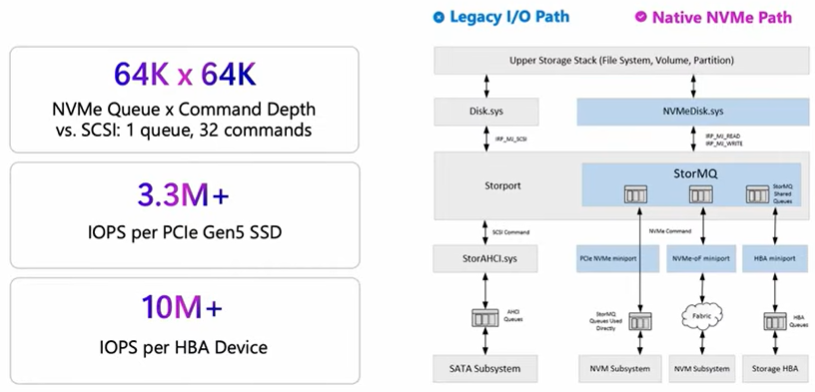
Until now, Windows Server has used SCSI for storage access. This protocol is outdated and can no longer meet today’s demands for speed and performance.
Storage media such as SSD and NVMe, along with their associated interfaces, now deliver significantly higher performance that cannot be utilized via SCSI. As a result, a large portion of this performance remains untapped.
Accordingly, Microsoft has completely redesigned the storage connectivity. Windows Server can now access NVMe storage natively, thereby unlocking its full performance potential.
To use NVMe, at least the October 2025 update for Windows Server 2025 must be installed. NVMe systems must use the native Windows drivers, not third-party drivers. In addition, NVMe currently still needs to be enabled manually via a registry value.
To access storage systems over the network instead of a direct connection, the iSCSI protocol has often been used until now. This protocol essentially has the same performance limitations as SCSI. Accordingly, Microsoft is introducing an improvement here as well and providing support for NVMe over Fabrics (NVM-oF). This feature enables the connection of storage systems over the network in a manner similar to iSCSI, but using the NVMe stack.
NVMe-oF will be available in two variants and will include additional improvements such as configuration via PowerShell and Windows Admin Center:
- NVMe/TCP (uses standard Ethernet network adapters)
- NVMe/RDMA (uses RDMA-capable network adapters for improved performance and lower latency)
ReFS
The Resilient File System (ReFS) is a file system for storage volumes in Windows. Compared to NTFS, it offers improved protection against data corruption and damage caused by failures. ReFS also delivers better performance in conjunction with virtualization and is more scalable (up to 35 PB). It was introduced in 2012 and was initially positioned for specific use cases such as data backups and archives.
It can now also be used for databases such as Exchange Server and SQL Server and is utilized in the context of Storage Spaces Direct. However, it has so far only been usable for additional storage volumes, not for the system volume (i.e., where Windows is installed).
Microsoft has now announced that ReFS will become the default file system, replacing NTFS. This addresses the increased demands for data integrity, resilience, and performance.
ReFS currently also allows you to create snapshots of files and streams. So far, however, its usability is limited, as these can only be created and deleted, but not restored. Therefore, there will soon be some useful enhancements for this:
- Restore snapshots
- Export snapshots
- Schedule automatic snapshot creation
- Retention policies (e.g., deletion after a certain period)
In addition, Windows Explorer is getting some great new features that can be tested in Windows Insider:
- 30% faster file deletion in Windows Explorer
- Copy operations support execution in multiple parallel threads
Software-defined storage in Windows Server 2025
According to Microsoft, the focus in storage systems is shifting toward software-defined storage systems rather than traditional hardware-based storage systems. Accordingly, Windows Server already includes features designed to support this trend.
One example is the “Storage Spaces” feature, which allows local disks to be combined into a virtual pool. If the server uses different types of disks (e.g., HDD, SSD, NVMe), these can be grouped into different performance tiers. This allows a Windows Server to be used as a virtual storage system.
Following the same principle, the “Storage Spaces Direct” (S2D) feature combines the disks of multiple servers into one or more virtual pools.
Until now, this functionality was limited to using Storage Spaces Direct only for servers within a single data center. With the new “S2D Campus Cluster” feature, storage volumes from multiple data centers can now be combined across locations.
Liked this article? Share it!


One thought on “Windows Server Summit 2026 | Part 18: Let's talk storage: NVMe, ReFS, and what's coming next”