Active Directory Certificate Authority - add issuer information
 Krähe mit Hut
A customer approached me and asked whether it would be possible to store additional information in his certification authority. Specifically, company information such as name and address would be stored. This would eliminate the need to enter this information manually each time a certificate is requested. The aim was to increase the internal trustworthiness of certificates.
While this information does not offer any technical added value, it can make perfect sense from an organizational point of view. Operators of public certification authorities (e.g., COMODO, DigiCert, and GlobalSign) also use extended issuer information.
What information fields are there?
The following information can generally be stored in a certificate - which of these is used depends on the intended use of the certificate:
- Full DN (canonical name/distinguished name)
- Common name
- Country
- Domain component
- First name/last name, initials, title (for user certificates)
- Company data, e.g., organization, organizational unit,
- Address data, e.g., street, city, state, country
This information can be entered manually in a certificate application if necessary. However, this only makes sense for manual applications/issuance. For larger and automated scenarios, it makes sense to store the information in the certification authority itself by default.
Can the information be stored with the certificate authority?
There is good news and bad news.
The good news: yes, it is possible.
The bad news: the information must be stored when the certification authority is installed. It is not possible to do this retrospectively.
In organizations that have been operating a certification authority for some time, it may not be so easy to set up a new certification authority. This also raises the question of the real added value of the additional information. It is unfortunate that Microsoft does not provide any sample values in Server Manager. Although there is a corresponding field in the installation wizard, it is empty.
How does it work?
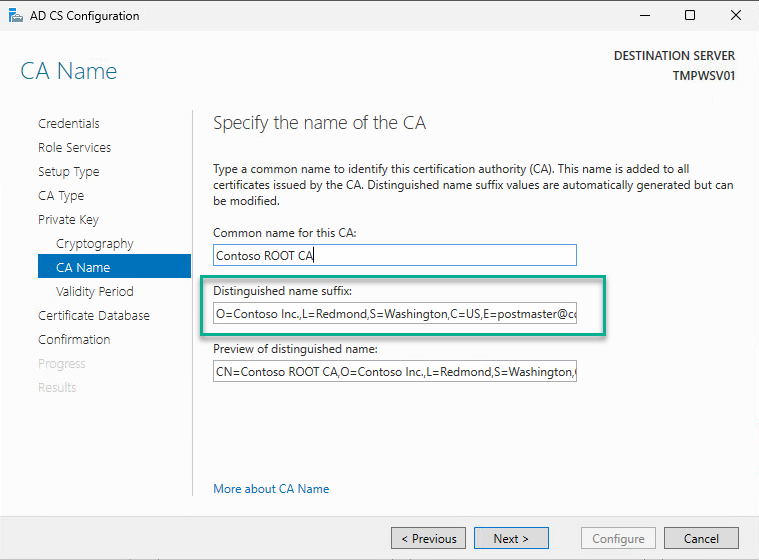
The additional information can be specified either in the Server Manager installation wizard or via PowerShell. This information must be in a specific format:
| Option | Meaning | Example |
|---|---|---|
| O | Organization | O=Contoso Inc. |
| L | City (Locality) | L=Redmond |
| S | State | S=Washington |
| C | Country | C=US |
| E | E=postmaster@contoso.com | |
| Street | Street | Street=One Microsoft Way |
Server Manager:
PowerShell:
# Install certificate authority with additional issuer information (example: Root CA)
Install-AdcsCertificationAuthority -CAType StandaloneRootCA -KeyLength 8192`
 -HashAlgorithm SHA512 -CryptoProviderName 'RSA#Microsoft Software Key Storage Provider'`
 -CACommonName 'Contoso ROOT CA' -CADistinguishedNameSuffix 'O=Contoso Inc.,L=Redmond,S=Washington,C=US,E=postmaster@contoso.com,Street=One Redmond Way'`
 -ValidityPeriod Years -ValidityPeriodUnits 21 -DatabaseDirectory 'C:\WINDOWS\system32\certlog'`
-LogDirectory 'C:\WINDOWS\system32\certlog'This procedure also applies to subordinate certification authorities.
After installation, the additional information is then included in the certification authority certificate. Incidentally, this information is retained even when the certificate is renewed; no special actions are required to keep the data.
Liked this article? Share it!