
Merging or separating Microsoft 365 tenants - a comprehensive guide
 Krähe mit Hut
Microsoft 365 services are now widely used. Many companies, large and small, use one or more of the available apps, such as Exchange Online, Teams, OneDrive for Business, or SharePoint Online. Of course, the "bouquet of flowers" is much broader than that.
Of course, the world does not stand still, but keeps turning. And it feels like it is turning faster and faster. Companies are looking for ways to keep up with developments. Sometimes they come to the conclusion that they can no longer do it alone.
In other cases, a company may decide to spin off individual divisions. This may be to refocus on its core business, remove non-strategic units, or improve its market position. In such cases, it is necessary to also separate the technical components of these units and transfer them to their own infrastructures. This process is typically referred to as a “carve-out.”
The following chapters refer primarily to the integration/merger of companies. However, the steps required for this are typically also necessary in the case of a separation. Therefore, this guide can basically be applied in both directions.
Together we are stronger!
When a company concludes that growth is no longer possible through its own efforts alone, it seeks reinforcements. These can take many forms; the following list provides some examples:
- Partnership with other companies. Typically a company in the same industry, but with a different (non-competitive) range of services.
- Joining a group of companies. Typically, the group works in the same industry, but its focus may be completely different.
- Merger with another company. Typically a company in the same industry and with a similar range of services, or alternatively a complementary range of services.
This inevitably leads to the question at some point:
What do we actually do with our different IT infrastructures?
Historically grown - optimization needed
Every company brings very different aspects to the table—different processes, systems, architectures, components, etc. Even in Microsoft 365, usage can vary greatly. This usually leads to a desire for standardization and homogenization at some point. This is primarily driven by the following criteria:
- IT operations should be cost-effective and efficient.
- Collaboration between employees should be as simple as possible and function without technical hurdles or makeshift solutions.
- All employees should have access to the same central systems, rather than each department using its own system.
Depending on what the companies have brought into the “marriage,” the process of homogenization can be very complex and lengthy. However, it also offers opportunities to get rid of legacy issues and switch to modern technologies together.
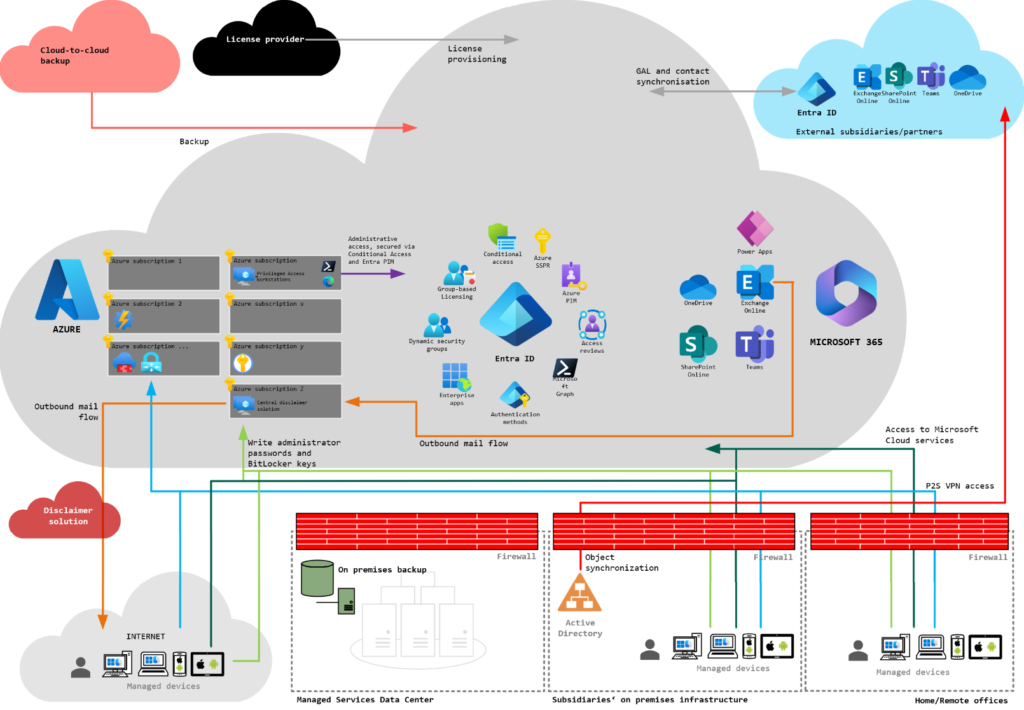
A typical structure for companies that have decided to collaborate:
- Traditional infrastructure on premises
- Synchronization of objects from Active Directory
- Use of different systems and apps for the same purposes
- Different levels of use of Microsoft 365 services
Integrating infrastructures - but doing it right!
A first step could be to consolidate the Microsoft 365 environments of the individual companies. Microsoft 365 usually provides the core functions for collaboration within the company and with other companies. This is why it is usually here that the greatest dissatisfaction arises when things no longer work as they used to or when additional steps have to be taken to collaborate with colleagues.
I have already planned and implemented several such integrations. I would like to share the experience I have gained from these projects in a series of articles. This should enable you to plan your projects efficiently and skillfully avoid some of the pitfalls. 😉
About the articles (planned, topics may still change!):
Part 1: Options for collaboration
Part 2: Administration of the environments
Part 3: Project organization and communication
Part 4: Organizational and legal pitfalls
Part 5: Selecting the migration solution
Part 6: Technical target design
Part 7: Communicate, communicate, communicate!
Part 8: Migration procedure
Part 9: Preparing the organizations
Part 10: Setting up the migration solution
Part 11: Carrying out the migration
Part 12: Supporting employees
Part 13: Handover to operations
Part 14: What have we learned?
Liked this article? Share it!



One thought on “Merging or separating Microsoft 365 tenants - a comprehensive guide”