Multiple email forwarding via inbox rules – not with Exchange Online!
 Krähe mit Hut
Many customer projects still revolve around moving a local Exchange organization to the cloud. Here, I repeatedly encounter special configurations for which a different solution must be found in the cloud.
Initial situation
This case involved email forwarding via inbox rules. On one side, a forwarding rule was set up in a mailbox that forwarded certain emails to a mailbox on the other side. In turn, a forwarding rule was also set up in this mailbox, which then forwarded these emails to other internal recipients (see also the diagram below). However, after the mailbox was moved to the cloud, forwarding no longer worked on the destination side.
Issue analysis
To identify the issue, I copied the message header of one of the forwarded emails (procedure: see Microsoft article) and pasted it into the Message Header Analyzer. This is a free tool provided by Microsoft for analyzing email message headers.
When checking the individual X headers, I noticed the following value: X-MS-Exchange-Inbox-Rules-Loop = 1
A quick search led me to a Microsoft blog page that explains this and other parameters in detail. According to this, Microsoft uses various headers to protect its mail systems from (unintended) loops. For example, Exchange checks whether an email was sent using a inbox rule and configures the header accordingly. However, there is a difference between Exchange Server and Exchange Online, which in this specific case means that the configuration no longer works.
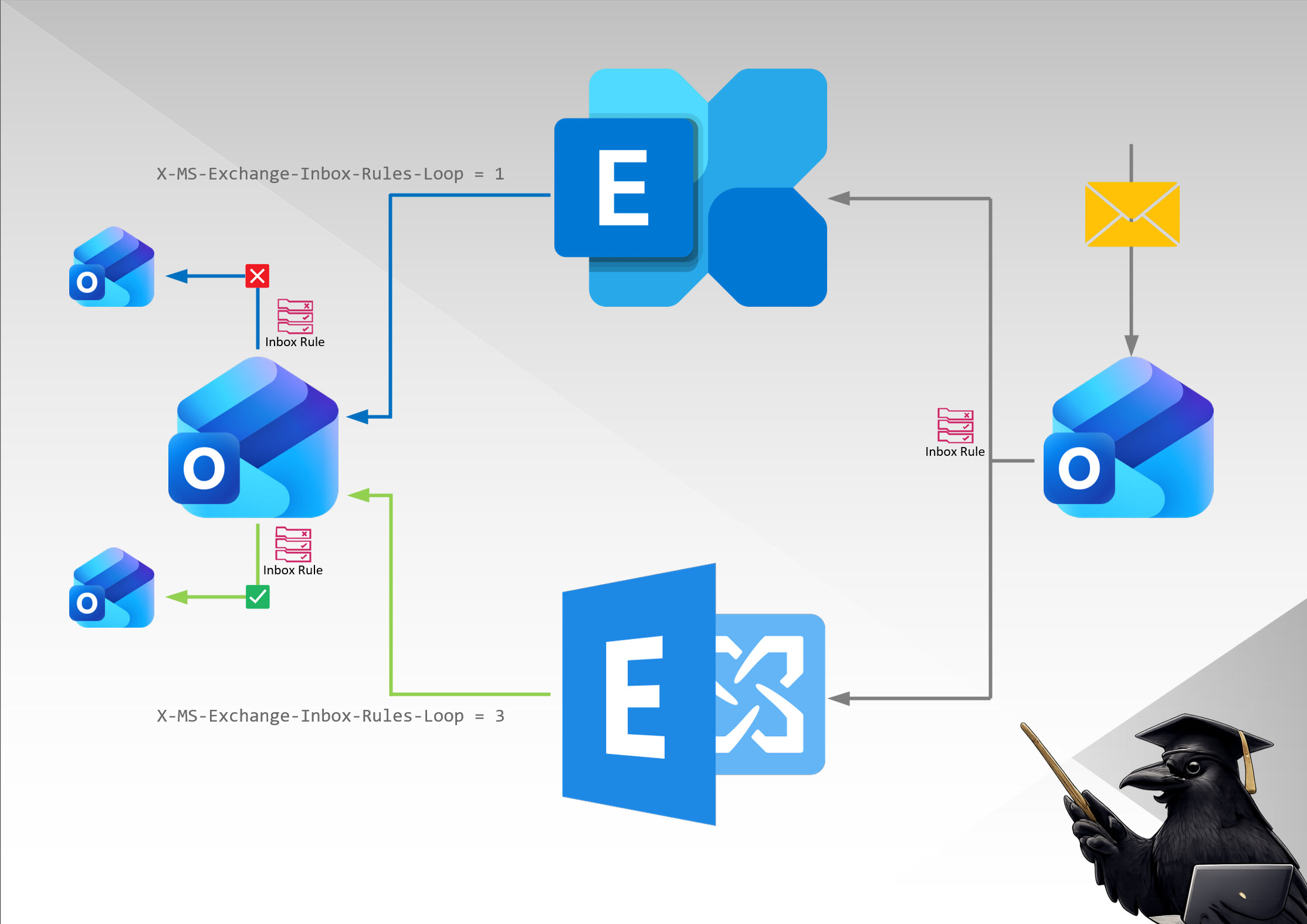
- Exchange Server sets a value of 3, meaning that emails may be forwarded a maximum of two times via a inbox rule.
- Exchange Online sets a value of 1, meaning that emails may no longer be forwarded via another inbox rule.
It was therefore clear that this type of email forwarding could no longer be used.
(Alternative) Solution
Before we get to the actual solution, a few words about the construct. It is generally not a good idea to allow external forwarding, as is the case here. External forwarding opens the door to data loss and intentional exfiltration! It is not without reason that external forwarding is disabled by default in Exchange Online. Hardening instructions also point out that the options for this in the Power Platform should also be blocked (the procedure is described in a Microsoft article).
Furthermore, this is a classic example of shadow IT—solutions are not implemented and documented by IT, but provided by users and are not subject to any control.
If it is absolutely necessary to forward emails externally, this should always be set up in a controlled and traceable manner. In this specific case, this means:
- Identify all persons who need to receive an email.
- Create email contacts in the sending system.
- Create an email distribution group and document its intended use in the description field.
- Add the contacts and, if necessary, internal recipients to the email distribution group.
- Send the email to the distribution group.
However, this is only suitable for a limited number of recipients. For larger numbers of recipients, a form of automation must be found. The solution for this, however, depends greatly on the individual scenario.
Liked this article? Share it!