
Windows Server Summit 2026 | Part 6: Evolving server management: priorities, roadmap, and tooling
 Krähe mit Hut
Companies no longer rely solely on their own data centers to provision IT systems. In addition to Microsoft 365, organizations are also adopting multi-cloud strategies to optimally leverage the strengths of each respective cloud environment.However, this necessitates different approaches to server management and introduces entirely new challenges compared to traditional methods. To address this, Microsoft offers relevant guidance and solutions for modern server management.
Key considerations
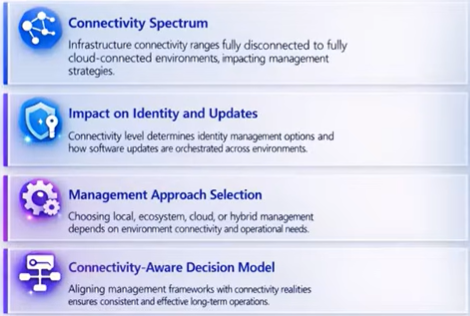
Microsoft outlines several key considerations regarding the optimal design of unified server management. Several aspects play a role here—for example:
- Type of connection
- Impact on identities and updates
- Management approach
Solution approaches
Fundamentally, there are various management solutions for different scenarios—for instance, Azure, System Center, or GitOps/CI/CD. Cloud-based solutions offer the greatest flexibility in this regard, as they function independently of the server's physical location. Other services may need to be utilized only in offline scenarios.
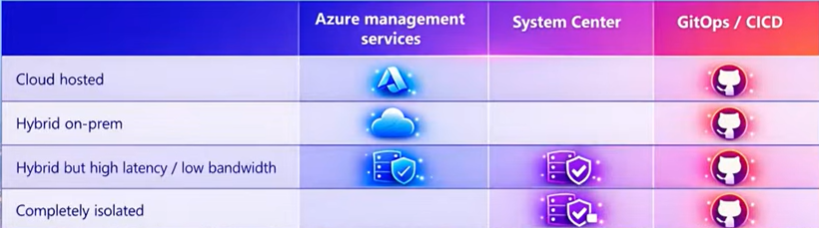
Microsoft therefore recommends utilizing a combination of Entra ID (identities), Azure services (management), and Windows Admin Center (control)—or, alternatively, migrating to this ecosystem from existing solutions in a phased manner. This session will demonstrate how Azure Arc, in conjunction with Windows Admin Center, aligns perfectly with this recommendation and serves as an ideal solution for most scenarios.
Simplified onboarding with Essential Machine Management
Even with cloud-based management, the onboarding and configuration of servers can become complex. To accelerate and simplify this process, Microsoft offers a new feature called "Basic Server Management" within Azure Arc.
With this feature, servers are onboarded centrally and automatically configured for use with the "Monitor," "Update Manager," "Machine Management," and "Change Tracking and Inventory" services.
The service is free of charge for virtual machines in Azure, as well as for virtual machines running under Software Assurance, ESU, or a Pay-as-you-go model. Following the public preview period, the service will cost $9 per server per month.
Liked this article? Share it!


One thought on “Windows Server Summit 2026 | Part 6: Evolving server management: priorities, roadmap, and tooling”