
Windows Server Summit 2026 | Part 14: Azure Virtual Desktop deep dive for Windows Server admins
 Krähe mit Hut
Azure Virtual Desktop (AVD) is a modern solution for delivering virtual work environments to an organization’s employees. As such, it enables a high degree of automation for deployment and scaling, thereby helping to ensure the most cost-effective operation possible.
This article provides an in-depth introduction to this technology and explains a new feature for AVD that can help companies replace traditional remote desktop deployments in on-premises data centers with modern technologies.
Windows Server 2025 Hyper-V innovation for Azure Virtual Desktop
As has been emphasized in previous sessions, Hyper-V is a strategic platform for Microsoft and is therefore used as the foundation for many products, not just for operating system virtualization.
Consequently, Hyper-V has been significantly enhanced in recent years with new features that now also allow AI language models to run on any hardware. Hyper-V also now supports the allocation of graphics card resources to virtual machines (GPU partitioning). The native integration of NVMe storage has also been extensively covered.
Azure Virtual Desktop for Windows Server
Azure Virtual Desktop competes directly with similar solutions from Citrix and Omnissa. Microsoft highlights its unique selling points as easy management via a central cloud-based platform and the availability of Windows 11 with multi-session support. This enables cost savings, as multiple employees can share a single virtual machine.
The power of Windows cloud solutions
Microsoft currently offers the following VDI solutions:
- Windows 365 (managed via Intune) – a platform optimized for simplicity and ease of use
- Azure Virtual Desktop (managed via the Azure portal) – a platform optimized for flexibility and customizability
- Azure Virtual Desktop in Azure Local – use of the functionality in your own data center, but on specialized hardware
The case for hybrid VDI
However, many customers are not willing to deploy resources in the cloud or already have on-premises hardware and licenses in their own data centers and therefore do not want to make additional investments in cloud services. Accordingly, Microsoft has developed another solution for these scenarios.
What is Azure Virtual Desktop for hybrid environments
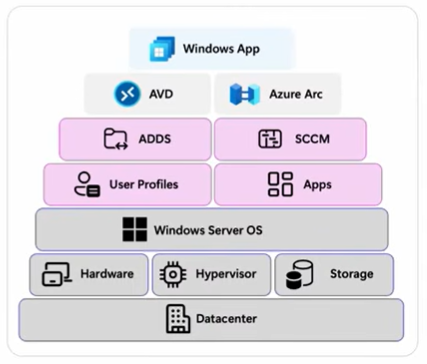
AVD for hybrid environments enables the deployment of an AVD platform in your own on-premises data center. No specialized hardware is required; an existing data center can be used for this purpose.
Management is handled through the Azure portal, so all familiar features and workflows are also available for the on-premises deployment.
The on-premises deployment is configured via Azure Arc using a special extension for AVD.
In this way, AVD can be operated in a hybrid manner, as the name suggests—users can access AVD deployments both on-premises and in the cloud, and the user experience remains consistent.
Usage scenarios
It is already evident in many areas that Microsoft wants to phase out traditional Remote Desktop deployments. On the one hand, there are already restrictions on the use of Microsoft 365 apps on Windows Server (only during the first 5 years of the lifecycle as part of Mainstream Support). On the other hand, Microsoft has already removed features from the server role in previous versions (Remote FX) and is no longer developing the role significantly.
This makes it all the more interesting that AVD for hybrid environments can, if needed, be built on the “Remote Desktop Session Host” server role. Alternatively, Windows 11 Enterprise can also be used. The Azure Arc extension configures the operating system accordingly and integrates the virtual machines into Azure Virtual Desktop host pools.
The beauty of this is that users can be gradually migrated from the old platform to the new one, as the user experience does not change significantly. It is not necessary to migrate all users at the same time. From there, the next step is to switch to virtual desktops in Azure Virtual Desktop.
In this way, a gradual migration to a modern platform can be carried out with minimal user impact and disruption.
Partner
Microsoft has named the following partners to help build AVDs for hybrid environments:
- ControlUp
- Login VSI
- nerdio
- Nutanix
Optimizations
Microsoft has released the Windows App to enable access to cloud-based VDI deployments. Unlike the traditional Remote Desktop connection, this app offers full support for modern authentication methods.
Windows Server 2025 now supports the Azure Virtual Desktop App Attach feature (for Azure Local and AVD for hybrid environments). This is an evolution of Application Virtualization (App-V), which has been deprecated since April 2026. This feature enables the dynamic delivery of applications in remote desktop sessions. The applications are not installed directly on the session hosts or VDI systems, but are centrally delivered via a storage medium or streaming.
This greatly simplifies the maintenance of virtualized desktops, as applications no longer need to be distributed. Instead, they are deployed once and dynamically integrated as needed.
Liked this article? Share it!


2 thoughts on “Windows Server Summit 2026 | Part 14: Azure Virtual Desktop deep dive for Windows Server admins”