
Microsoft 365 Migrations | Part 5: Technical Target Design
 Krähe mit Hut
Once all organizational and legal requirements have been clarified, we can finally get started on the technical side. And this is no small task—depending on the scale, the systems and applications involved, and the planned approach, it can become very complex!
Typically, adjustments to the project plan are made at this stage, if not earlier. The plan was initially drafted in broad terms and based on best judgment. However, details often emerge that require coordination, necessitate additional steps, or can even bring the project to a temporary standstill.
This article is therefore intended to provide insight into what a technical target design for a Microsoft 365 migration might look like and what potential pitfalls may arise in each case.
Target designs of varying complexity
First things first: there is no single “one-size-fits-all” migration plan that every company can apply. This must be determined on a case-by-case basis and depends, among other things, on the following questions:
- Is there a predefined timeframe that must be strictly adhered to (e.g., due to legal requirements)?
- Which services need to be migrated? (e.g., Exchange Online, SharePoint Online, Teams, Power Platform, etc.)
- Do any locally deployed systems need to be taken into account during the migration (e.g., Active Directory, Exchange Server, SharePoint Server, etc.)?
- To what extent should the transition for users and devices be automated, and will users receive new devices as part of this process?
- What approach will be taken to resolve any errors or outages that may arise (the so-called “fix forward” approach or very careful planning to minimize disruptions)?
- Is this an integration or a carve-out?
The following chapters present several target designs that I have already planned and implemented in practice. The content builds upon itself; that is, each chapter automatically assumes the considerations and plans outlined in the previous chapter.
Device-independent migration
| Short description | The process simply involves creating new accounts and transferring data from the source environment to the target environment |
| Scenario | Short migration period (weeks, a few months), low migration complexity |
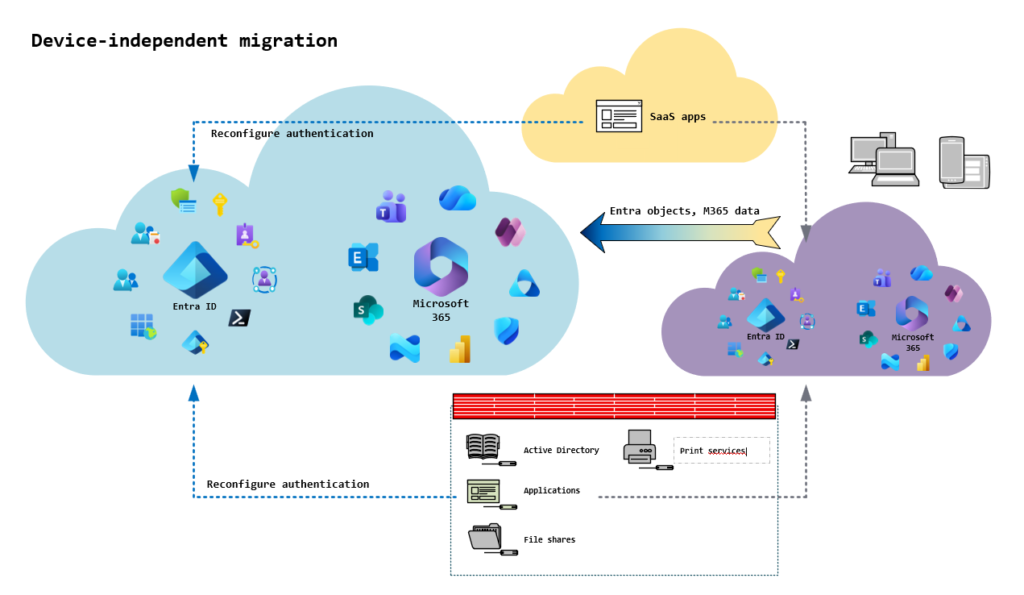
ADue to factors such as company dissolutions or legally time-sensitive separations, it may be necessary to carry out a migration as quickly as possible. In such cases, we plan the absolute minimum set of tasks required for a clean transfer of data and accounts. These include:
- Identifying the Microsoft 365 services to be migrated (e.g., Exchange, Teams, SharePoint, OneDrive, as well as Power Platform, Power BI, Purview, etc.)
- Identifying the objects to be migrated (users, groups, sites, apps connected to Entra ID)
- Determining the licenses to be used based on security and compliance requirements
- Determining which domain and username syntax should or must be used for external communication
- Identifying dependencies of third-party apps and systems on Entra ID and Microsoft 365 and planning the transition
Since this scenario involves little to no automation (e.g., data migration), comprehensive and careful user communication is all the more important. Users typically carry out the migration steps on their own. Therefore, they need instructions and information about the upcoming changes in an appropriate format.
However, this form of migration is not suitable for a spin-off. In this case, the end devices must be taken into account, as they legally belong to the spinning-off company and may also have applications installed that the spun-off company is no longer permitted to use. In this case, the next form of migration should be considered.
If the infrastructure is accessible via VPN, it can continue to be used through the existing implementation. The receiving company’s infrastructure can be made accessible either via the same VPN or through an additional VPN client.
Device-dependent migration
| Short description | In addition to data and user accounts, end devices are also migrated or new end devices are provisioned |
| Scenario | Moderate migration duration (a few months), moderate migration complexity |
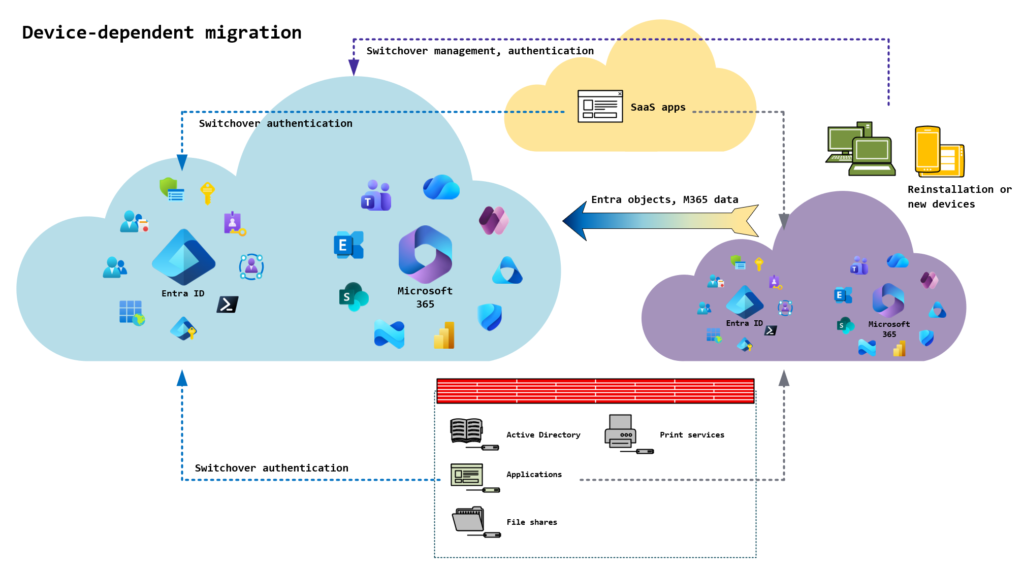
Under the minimal approach, employees’ devices are not taken into account (apart from the necessary account switch). Depending on how these devices were previously integrated and managed, this can result in recurring issues for employees or for device management. The following list shows some examples of this:
- To preserve the employee’s user profile, the device was not removed from the Active Directory/Entra ID of the legacy environment. As a result, the user must continue to log in to the device using credentials from the legacy environment.
- Removing the device from a management solution such as Intune may not be possible without a full reset of the device. However, parallel management of the device via another solution is also not possible.
- Even after the old accounts have been removed from the device, configuration remnants may remain on the device. This can cause the apps to repeatedly attempt to authenticate via the legacy environment, resulting in error messages.
For these reasons, it is recommended to also plan for device migration. However, this significantly increases complexity, as device usage must be carefully tracked. The following table shows typical questions in this context:
| Question | Approach |
|---|---|
| Can data be stored on the local device, and what is the company policy regarding its handling? | Transfer data to OneDrive or another central storage solution; prohibit local storage |
| Which applications are (still) required, and what prerequisites must be met for them? | For spin-off: Enable access via VPN, Remote Desktop, or a suitable alternative For integration: Determine how access to the application can be implemented from the new environment |
| What policies and configurations are required on the devices? | Review the current management solution and, where possible, adopt its configurations and policies |
| How do users log in to the devices, and how does this affect security requirements and authentication methods? | Review the login method(s) and provide alternatives if necessary. |
| Do the devices support modern operating systems, or are new devices (in some cases) required due to security requirements? | Record the hardware specifications of the devices and replace them as needed |
Depending on the situation, devices can be re-installed using a solution such as Autopilot in Intune. Alternatively, employees can be provided with new devices prior to the migration. This allows them to better adjust to the new features and changes that come with the migration. The old device also remains available in case anything is still missing.
Full migration
| Short description | All of the company's (cloud) resources are either integrated into the central environment or migrated out of it. |
| Scenario | Longer migration period (ranging from many months to several years), high migration complexity. This approach is better suited for small businesses or when the migration period is of secondary importance. |
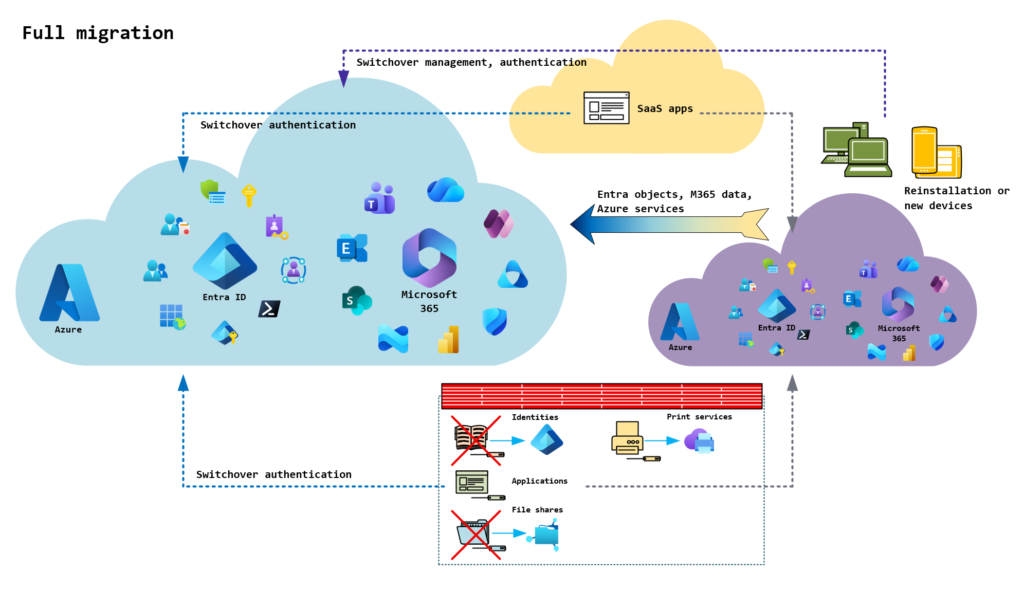
The goal of a full migration is a complete transition of the cloud resources—and, if applicable, the on-premises resources—of the company being integrated or spun off. Strictly speaking, however, this is no longer a pure Microsoft 365 migration, as resources from other services such as Azure and Active Directory, as well as server roles, must also be taken into account. However, this may be absolutely necessary, particularly in the case of a spin-off.
The migration of on-premises and Azure resources—or the setup of a new Azure platform (or an on-premises platform, if necessary)—is a highly complex process and will therefore not be covered further in this series of articles.
Regardless, this type of migration can be used to “break with old habits.” Since the entire infrastructure is being reviewed anyway, modernization makes a lot of sense in this context. For example...
- ...a local Active Directory can be reconfigured so that it can be managed from within Entra ID.
- ...traditional file shares can either be migrated to SharePoint Online or converted to cloud shares in Azure File Shares.
- ...printers can be provisioned using the modern Azure Universal Print solution.
This can be more effective than continuing to make these services accessible via a traditional VPN, which can involve additional overhead for authentication and routing.
Parallel operation
| Short description | Due to certain factors, migration cannot take place in a timely manner. However, employees must already be using the new domain for external communication. Employees will therefore be provided with additional accounts in the new environment. |
| Scenario | A longer transition period until any obstacles are removed. The migration period and complexity depend on the migration process required. A full migration is usually chosen, as there is typically sufficient time for this in this scenario. |
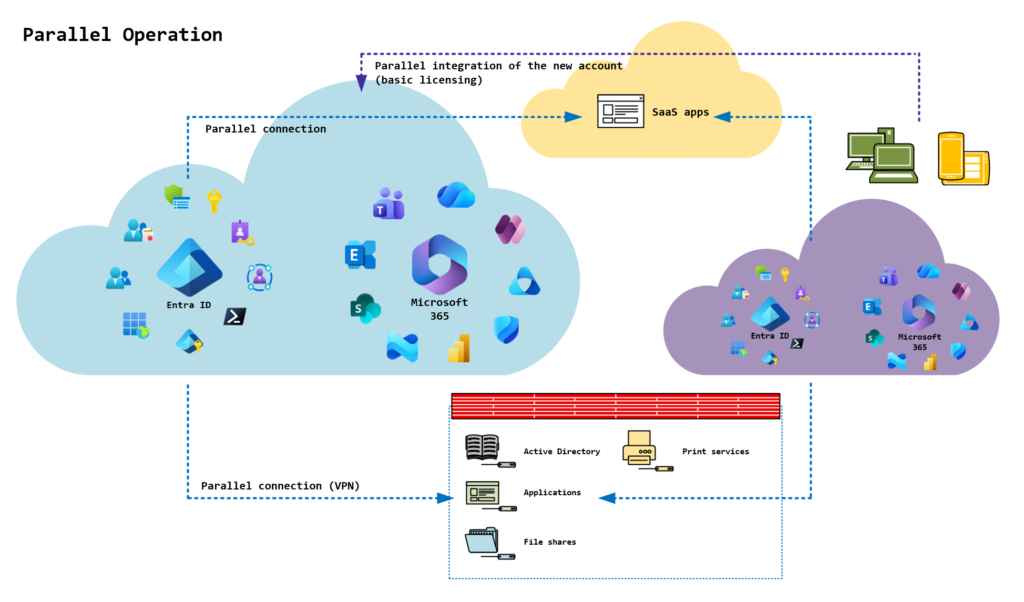
There are scenarios in which a migration may not (yet) be possible due to time constraints or legal requirements. In such scenarios, parallel operation may be considered, in which employees are provided with accounts in both environments for a certain period of time. This parallel operation, in turn, can take two possible forms:
- Early access to internal resources as part of an integration
- Provision of full-featured communication under a new domain as part of a merger or spin-off
Early access to internal resources
After acquiring a new company, it is not necessarily integrated into the internal infrastructure right away. In some cases, the new company first undergoes an earn-out phase to assess whether it can generate the promised revenue. If the requirements are not met, the company may be dissolved or divested.
Nevertheless, it may be necessary to provide employees of the company to be integrated with access to internal resources in advance. In this case, employees are granted guest user accounts in the host environment beforehand so that they can be integrated into existing Teams rooms and document libraries. This allows new employees to familiarize themselves with internal structures and processes in advance, thereby preparing for the upcoming integration and collaborating on projects within the acquiring company.
No new licensed accounts are created during the integration/migration process. Instead, the existing guest user accounts are converted into internal user accounts and licensed. As part of this process, employees will receive specific login credentials for these accounts. Any existing authentication methods, such as the Authenticator app, will remain in place and can continue to be used.
However, as part of this process, security requirements may also be tightened, and employees may be asked to set up phishing-resistant authentication (e.g., FIDO2 security keys, passkeys in the Authenticator app, etc.). Technically, this is not yet possible for guest users.
Full-featured communication under a new domain
Due to factors such as company dissolutions or legally required spin-offs, it may be necessary to set up communication under a new domain as quickly as possible. In such cases, it may not be possible to plan and fully complete a migration in advance.
Instead, employees are granted access to the new environment in advance to enable them to communicate under the new domain. This requires full access (i.e., licensed “Member” user accounts), since guest users cannot use or access an email mailbox in another tenant (not even shared mailboxes).
In such a case, it is also important to ensure that communication via the previous domain is technically blocked. For email, this can be implemented, for example, using transport rules in Exchange Online. In Teams, external communication can be selectively restricted based on Entra security groups, if necessary.
Liked this article? Share it!



2 thoughts on “Microsoft 365 Migrations | Part 5: Technical Target Design”