
Microsoft 365 Migrations | Part 6: Choose the migration approach
 Krähe mit Hut
In the previous post, I outlined various approaches for planning a migration in general and discussed the key factors involved. However, in my projects, I’m repeatedly asked a specific question about the actual process:
So how exactly should we go about this? Do we move everything over in a single weekend, or do we need to proceed in stages?
That’s a good question, and not just in the context of a Microsoft 365 migration. As with other migrations, there’s no one-size-fits-all answer that works for every company. However, there are many factors that can influence the decision-making process. For this reason, a separate section of this series is dedicated to this topic. It focuses on the question:
BIG BANG OR PHASED MIGRATION?
Definition of terms
Before we discuss which method can (or perhaps should) be used in which situations, let’s first clarify what these terms mean. With this understanding, we can then identify the specific requirements and characteristics of each method.
Big Bang

The name gives it away a bit—in the so-called “Big Bang” approach, objects and resources are all migrated at once, so to speak, at a defined point in time (such as a weekend). Another common term for this is the “cutover” approach.
A Big Bang migration must be carefully planned and prepared in advance so that, ideally, it doesn’t end in a big bang. Such a migration also requires a great deal of effort at the specified time in terms of coordination, personnel, and technical measures, as well as typically high costs for troubleshooting after the migration.
The Big Bang approach has the advantage that costs are incurred only once, and problems are avoided by not running the old and new systems in parallel.
Phased

In a phased approach, objects and resources are migrated gradually in coordinated and defined packages. The old and new systems run in parallel for a certain period of time. This approach is also known by other names, such as wave migration, phased migration, or iterative migration.
A phased approach spreads out the migration workload by extending it over a longer period of time. However, this also involves a significant coordination effort, as personnel resources must be allocated over an extended period. The phased approach does, however, have an advantage over the “big bang” approach in that the migration can be temporarily halted if necessary.
Migration approaches in the context of Microsoft 365
So what's the right approach for a Microsoft 365 migration? To put it in the typical words of an IT pro: “It depends.” 😉
Decisive factors
Several factors are crucial when determining which migration approach is appropriate. However, depending on your personal assessment, these factors may support either one process or the other. The following table is intended to illustrate this. The table does not claim to be exhaustive but is meant to provide guidance. There may be other factors that are decisive for your migration.
| Criterion/Factor | Assessment: [Big Bang] | Assessment: [Phased] |
|---|---|---|
| Impact on users | A migration generally has a significant impact on users. With the “Big Bang” approach, however, the impact is concentrated within a very limited time frame. This gives users the impression that it is a single, cohesive transition rather than a series of small changes. | In a phased approach, users must repeatedly make different changes at different times. This reduces acceptance of the project as a whole, as users are repeatedly disrupted in their ability to work and/or their daily routines. |
| Size of the organization to be integrated or carved out | The steps involved in a migration are generally the same, regardless of the number of users. However, the performance of the migration solution is important here (i.e., how much time is required for the final data synchronization). In this context, a maximum of 2,000 users is considered manageable for a Big Bang migration. This also requires that sufficient personnel resources be available for the subsequent Hyper Care phase, especially when there are multiple locations. Careful planning is also necessary to account for all necessary changes and adjustments. | A phased approach is significantly more complex to implement, regardless of the number of resources to be migrated, since the existing and new environments must be operated in parallel during this period. There are also numerous additional dependencies between the environments (such as access to shared mailboxes, distribution lists, switching between Teams environments, etc.), which carry a high risk of disruptions and errors. Furthermore, this approach requires users to repeatedly adapt to and implement changes, which, based on experience, is not well received. |
| Coordination of project participants | The larger the company in question, the greater the number of project participants tends to be. At some point, this can lead to more time being spent on discussion than on actual planning and implementation. It is therefore advisable to strictly limit the group of people responsible for technical analysis and planning, as this planning is essential for the technical success of the migration project. In a “Big Bang” approach, this results in a one-time increase in the effort required to allocate personnel resources during the Hyper Care phase and for any potential follow-up work. | A phased approach results in increased migration effort over a longer period of time, since new migrations are essentially taking place repeatedly. Personnel resources must be made available repeatedly for implementation, hyper care, and follow-up work; however, it is not necessarily guaranteed that the same resources will always be available. Consequently, it may be necessary to train new staff first so that they can provide adequate support. |
| Technical operations | In a Big Bang migration, operations can be clearly separated from one another. The specialists responsible for the existing environment - either join the operations team for the new environment (integration) or - move to a new operations team (carve-out), and - operations for the legacy environment continue to be handled by the new operations team or remain with the existing team. | In a phased migration, the old and new environments must be operated in parallel for a certain period of time. This results in increased effort, as any requirements that arise in the meantime must be updated in both environments. In some cases, individual coordination between the different operations teams may also be necessary. Additionally, the individual workload can increase significantly if, for example, the companies’ infrastructures differ from one another. |
| Organizational structures | Organizational structures have a significant impact on when and how data can be transferred. Companies typically operate across departments rather than in silos. In a “big bang” migration, however, this issue is secondary, since all resources are transferred in a single step. Accordingly, internal dependencies do not need to be taken into account to any significant extent. | In a phased migration, organizational structures must be carefully considered, as they must remain operational throughout the individual migration phases. Therefore, packages of related resources must be put together to maintain operational capability in the new environment as well. However, this is not possible for all services (e.g., Teams). As a result, users may need to work in both environments at times. |
| Services to be migrated | Determining which services to migrate can have a significant impact on how the migration proceeds. For example, if only the “standard” services—Exchange, SharePoint, and Teams—need to be migrated, this can be accomplished quickly and easily with any standard migration solution. However, if additional services are involved (especially those that cannot be migrated directly), a “big bang” approach may not be feasible in all cases. | A phased approach can be implemented here in different ways: A) Service by service B) Standard services / advanced services For option A, it is important to note that there are dependencies between the services, so they must be considered as a group. For example, personal Teams chats should not be migrated without an Exchange mailbox, as they use the mailbox as their storage location. In option B, the standard services are considered as a group, while advanced services such as Forms, Power BI, etc., are addressed separately. |
| Approach for migrating devices | In general, it is recommended to refresh the devices as part of the migration—for example, by reinstalling them or replacing them. However, if there is not enough time for the necessary preparations, device migration can be separated from the rest of the migration tasks. In this case, it is important to note that, during integration, security restrictions in the receiving tenant may prevent the integration of such devices (unmanaged). | A phased approach can be implemented in two ways with regard to devices: A) Devices are replaced or newly installed before the migration B) Devices are replaced or newly installed after the migration Both approaches are designed to reduce the effort required for the actual migration, so that only the background tasks (data migration, app migration, etc.) need to be planned and carried out. The device migration can be carried out in tailored phases (e.g., by department, by location, etc.). |
| Performance of the migration solution | Common migration solutions typically feature a direct connection to the Microsoft backend. As a result, data can be transferred very quickly (exception: Exchange Online, as significant throttling is implemented there). This should be validated in advance to enable an approximate calculation of the expected migration duration. The average weekly data growth is also a key factor in determining the time window required for both the delta and final synchronization. As a rule of thumb, a delta migration should not take longer than 12 hours. This usually allows enough time to complete the migration tasks and then initiate the final synchronization. | If a delta synchronization takes more than 12 hours or does not perform well (for example, because mailboxes contain significantly more items per folder than is officially supported), a single migration weekend for all objects is most likely out of the question. In this case, migration phases must be planned, taking into account the available help desk staff and the number of employees. The goal should be to keep the parallel operation of the old and new environments as short as possible, as experience has shown that this generates the most support tickets. |
| Availability of human resources | As part of the migration process, stakeholders from all project areas are needed to ensure that each step is carried out efficiently and thoroughly. The actual resource requirements depend on the extent to which the process can be automated (e.g., through the use of scripts). However, especially after the migration, there is typically a high demand for resources to analyze and resolve issues, particularly when many systems are migrated at once. This requires both infrastructure staff and help desk staff (remote and on-site), as issues must be resolved as quickly as possible. If these resources cannot be adequately provided, a “big bang” approach is likely not feasible or is only possible with significant disruption to employees. | A phased approach is advisable when there are insufficient personnel resources available, particularly for troubleshooting. This is especially true when the integration or spin-off is tightly scheduled overall. In such a case, the available personnel resources must be reserved for an extended period so that they are available for each migration wave. The use of different or multiple teams is advisable only if their scope remains strictly limited. Otherwise, it is not possible to draw on existing experience, as each team must build and establish its own experience and procedures from scratch. |
| Time criticality | A key factor in selecting the migration approach is the available timeframe. A tight schedule tends to favor a big-bang migration; however, such an approach may not be the best course of action given the other factors in this table. This may then prompt a discussion of the planned timeframe and a clear explanation of the reasons behind it. For a Microsoft 365 migration, the guiding principle “quality over speed” applies in particular, as there are many variables that can significantly reduce quality and, consequently, the user experience. And especially when using Microsoft 365, negative user experiences should be minimized as much as possible, as otherwise efficient collaboration within the company may suffer. | If there is sufficient time available for planning, preparation, and implementation, a phased approach can generally be considered. However, this is subject to whether other factors also support a phased approach. Based on experience, a “big bang” approach is usually better for Microsoft 365 migrations, as it typically disrupts the user experience only once. |
Sure, that’s a lot of (dry) theory. To sum it up, based on my own experience, I’d generally always prefer a Big Bang approach whenever it’s at all possible.
Users are typically very confused by the switch between different environments (Which account do I need to use for what? Why am I not receiving this message / why didn’t my message reach the other person (but went to the guest user instead)?) and the confusion grows the longer the transition phase lasts. That’s why I’m a big fan of migrating everything as quickly as possible and preparing for it carefully!
Example scenarios
To illustrate this, I'll go over a few sample projects below and explain why we chose the specific migration method for each one.
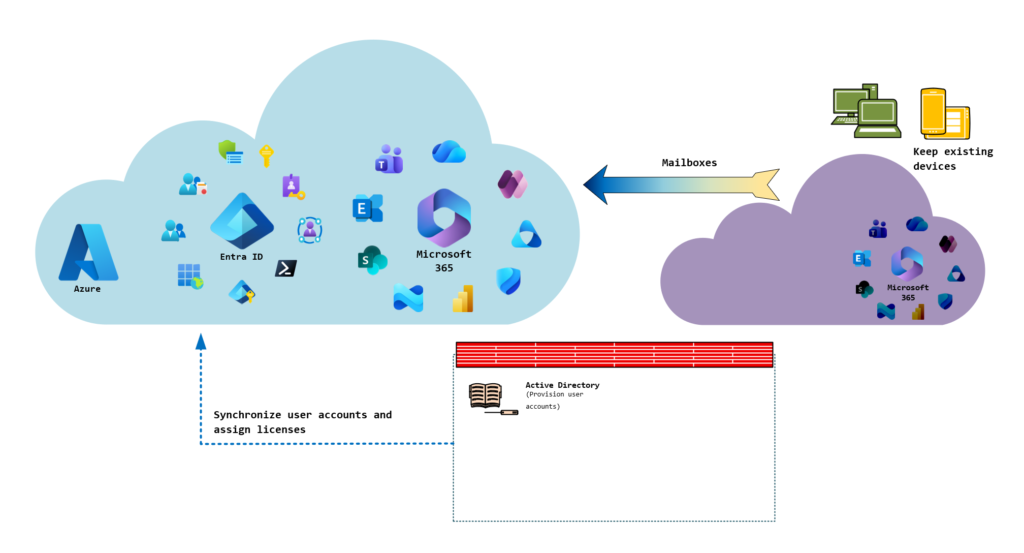
Scenario 1: Exchange only
| Key parameter | Details |
|---|---|
| Short description | Exclusive migration of mailboxes between Exchange Online environments |
| Customer environment | Primary environment: hybrid with local Active Directory and Exchange Server (administration only) Environment to be integrated: Location in another country, cloud-only deployment; approximately 50 users |
| Time frame | 3 months |
| Migration solution used | CodeTwo Office 365 Migration |
| Migration approach | Big Bang |
The Big Bang approach was the obvious choice in this case, since the number of employees was small and only mailboxes were to be migrated. Accordingly, the preparatory steps—such as setting up user accounts and mailboxes and compiling a list of the email addresses in use—were completed quickly.
A weekday morning was chosen for the migration, since only a final synchronization and the migration of the custom domain needed to be performed. The devices remained in their current state, and the new accounts were simply integrated into the apps. The devices were then replaced at a later date, based on their lifecycle, with standardized devices from the acquiring company.
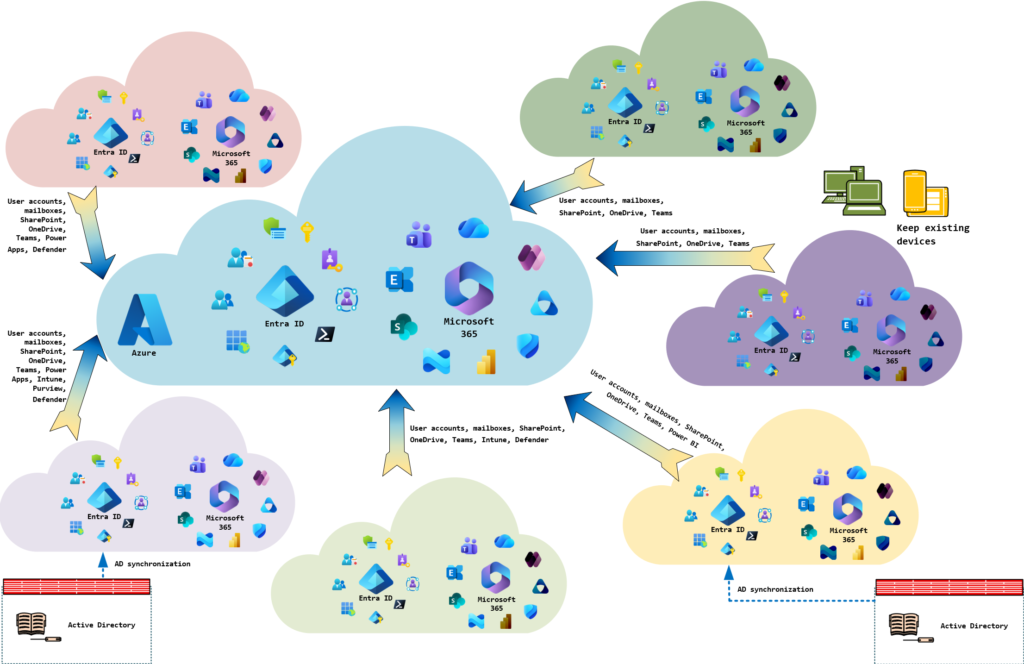
Scenario 2: Integrate all companies into central parent environment
| Key parameter | Details |
|---|---|
| Short description | Integration of all companies within the corporate group into the central parent company |
| Customer environment | Primary environment: pure cloud deployment with isolated infrastructure components in Azure Environments to be integrated: vary, i.e., hybrid with Active Directory, pure cloud deployments, some Azure infrastructure and/or on-premises infrastructure; varying number of employees (15–500) |
| Time frame | 6 months with a start date at the turn of the year (i.e., a fixed end date) |
| Migration solution used | AvePoint Fly |
| Migration approach | Big Bang |
First things first: DO NOT TRY THIS AT HOME! 😉 From an organizational standpoint, it had been decided that all companies must be integrated by the turn of the year in order to operate exclusively under the parent company’s name from that point on. Accordingly, the scheduled completion date could not be adjusted. Additionally, the requirement was that duplicate licensing costs must be avoided at all costs whenever possible.
The project began around the middle of the year, so we had about 6 months available for analysis, planning, and implementation. Due to the time and cost constraints, the “big bang” approach was the only way to meet both requirements. Accordingly, we focused exclusively on achieving this goal in this project, while at the same time trying to minimize any disruption to the user experience.
Consequently, the end devices were left largely in their current state and were only integrated into the central Intune infrastructure when this could be done without resetting the device or affecting the user profile. When reviewing the Microsoft 365 services, specific areas were identified where migration would have been too time-consuming or complex, such as platforms in SharePoint Online used for collaboration with customers.
Consequently, such structures were left in the legacy environment in isolated cases, and access was cost-effectively implemented via guest users from the new environment.
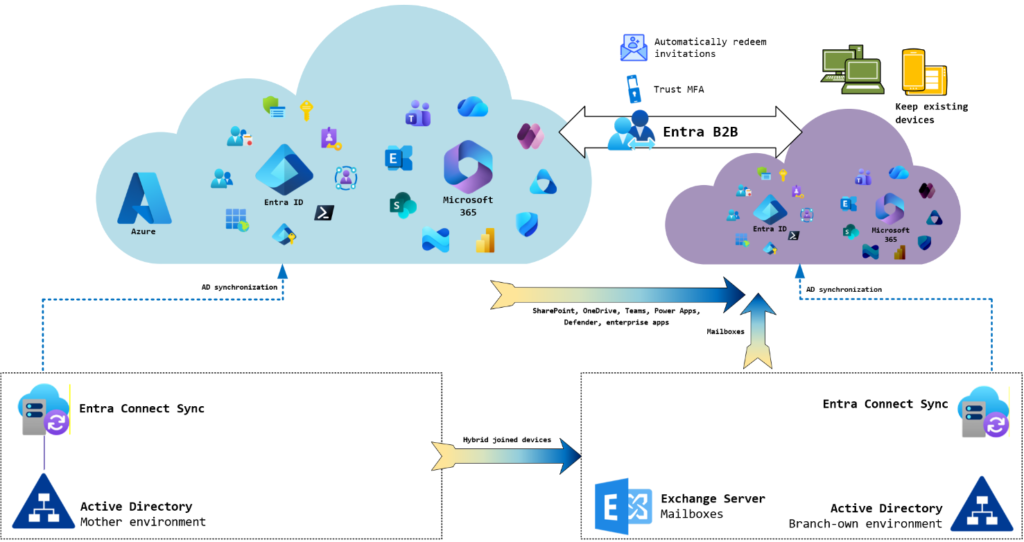
Scenario 3: Carve-out of business units into separate tenant
| Key parameter | Details |
|---|---|
| Short description | Separation of multiple business units into separate tenant |
| Customer environment | Primary environment: Hybrid deployment with on-premises Active Directory Environment to be migrated: Hybrid deployment with on-premises Active Directory and Exchange Server (mailbox deployment); approximately 1,500 users |
| Time frame | Approx. 1 year with a fixed end date due to specific licensing requirements (i.e., a fixed end date that cannot be changed) |
| Migration solution used | Quest On Demand Migration + Hybrid Exchange |
| Migration approach | Big Bang |
In this scenario, regional divisions of the company were to be spun off into their own tenant. However, the divisions were separated only technically, not organizationally. Accordingly, continued collaboration between the divisions was desired or required. This introduced a certain degree of complexity into the planning process, as it was necessary to carefully examine which company apps, Teams rooms, SharePoint sites, etc., were being used and how, in order to plan the following changes:
- Only employees of the source infrastructure: Remove employees from the divisions to be carved out
- Employees of only the infrastructure to be spun off: Migrate data and connections to the new tenant and delete them from the legacy environment
- Employees from both infrastructures: Determine ownership shares and either migrate them or leave them in the legacy environment and reconfigure access rights
To achieve this, an Entra B2B relationship with appropriate trust settings was established, along with cross-tenant synchronization to enable cross-tenant access.
An additional layer of complexity arose from the interlinked local infrastructure:
- Each business unit had its own Active Directory
- Objects were synchronized from both ADs into the existing environment via a central, externally managed Entra Connect Sync instance
- The Exchange organization of the regions to be carved out was in a hybrid deployment with the transferring environment
- Access to the local Exchange mailboxes was implemented using hybrid modern authentication.
A phased approach would have meant that users accessing their mailboxes via a mobile device would have lost access during the transition period. This was deemed unacceptable. Consequently, the only option left was the “big bang” approach, which was scheduled for a long weekend to allow sufficient time for all migration tasks.
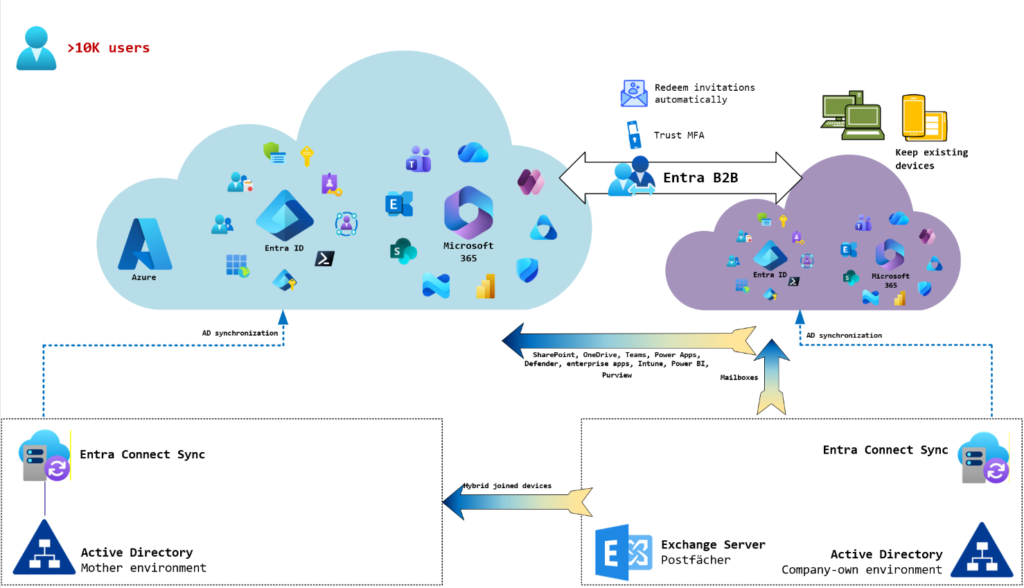
Scenario 4: Integrate a large subsidiary
| Key parameter | Details |
|---|---|
| Short description | Integration of a very large subsidiary |
| Customer environment | Primary environment: Hybrid deployment with on-premises Active Directory Environment to be integrated: Hybrid deployment with on-premises Active Directory and Exchange Server (mailbox deployment), >10,000 users |
| Time frame | Approx. 1.5 years; end date theoretically variable |
| Migration solution used | Microsoft Migration Orchestrator (Exchange, Teams 1:1 chats, ShareGate (SharePoint/Teams rooms only), Exchange hybrid deployment (mailboxes)) |
| Migration approach | Phased |
In diesem Szenario (ist aktuell in Planung) soll eine sehr große Tochter (weit über 10.000 Benutzerkonten) in die zentrale Umgebung der Muttergesellschaft integriert werden. Aufgrund der schieren Masse an Benutzern (und dementsprechend In this scenario (currently in the planning stages), a very large subsidiary (well over 10,000 user accounts) is to be integrated into the parent company’s central environment. However, given the sheer volume of users (and the corresponding number of company locations), a “big bang” approach seems unrealistic:
- Under no circumstances can sufficient personnel resources be allocated for the hyper-care phase following the migration.
- No hardware manufacturer can deliver this volume of devices within the time frame still available. The devices would all have to be ordered and stored well in advance, which is considered unreasonable in terms of the hardware lifecycle. Furthermore, there are insufficient resources available for the initial deployment of all devices. The devices will therefore be addressed only after the migration.
- Due to the large number of resources to be migrated or converted (e.g., distribution groups, corporate apps, etc.), a large number of responsible individuals would need to be coordinated during and after the migration to ensure that the necessary measures are carried out. This is considered unrealistic.
An additional layer of complexity arises from the fact that the company has decided to use Microsoft Migration Orchestrator for the migration of user data. Among other things, Microsoft promises that
- Teams 1:1 chats can be migrated directly (i.e., without being converted into a group chat),
- old access links to OneDrive and SharePoint shares will continue to work after the migration (via an automatically configured redirect), and
- the migration speed is expected to be significantly faster than with standard migration solutions due to the direct connection.
ShareGate will be used for the migration of SharePoint Online and Teams rooms, as the Migration Orchestrator does not (yet) support their migration.
Due to all these factors, a phased approach will be implemented. Over a period currently planned to last 3 months, 2,000 user accounts—including their data—will be migrated in several batches. Access to data that has not yet been migrated will be provided via Entra B2B. This requires extremely careful communication with users to explain every change and its respective impact on the user experience in detail.
Once this migration is complete, I will revise this scenario accordingly based on the experience gained.
Liked this article? Share it!


2 thoughts on “Microsoft 365 Migrations | Part 6: Choose the migration approach”