
Microsoft 365 Migrations | Part 3: Project Organization
 Krähe mit Hut
The decision has been made—the acquired company is to be integrated, or part of the company is to be transferred to its own environment.
This decision is typically made not by the IT department, but by senior management. Consequently, at the time the decision is made, the scope of work required for the migration is usually unknown. And no two migrations are alike. While the same services are generally considered and migrated, unique challenges can and will arise.
So, how should you proceed when the migration order comes in? And which Microsoft 365 tools can make your life easier in this process? This article shows you!
Project planning
A Microsoft 365 migration is not a change that can be handled “on the fly.” It is the central platform for collaboration and communication on which many business processes depend—and thus business operations as well. Accordingly, it is clear that proper organization is required to cover all essential aspects of the change.
There are established project structure approaches for such purposes. Which one is chosen depends on the company’s preferences and, if applicable, on the employee(s) who will take charge of project management. A project creates the necessary framework to carry out the required preparations and planning and ultimately execute the project.
The following approaches are therefore not exclusive to a Microsoft 365 migration but can generally be applied to any project. They are nevertheless listed here for the sake of completeness, as there are always companies that carry out such projects without proper planning or believe that a project manager is not necessary for this.
Project controlling
Many companies make the mistake of assigning such a project to the IT department. While IT is the implementing force, it typically lacks the personnel and/or expertise in project planning and management (though there are, of course, exceptions). It is better to assign the project to appropriately trained project managers, who will then plan the necessary resources from all departments (both IT and the business).
In smaller projects (e.g., <100 users), this role may also fall to an architect if they possess the necessary project management skills. However, they should then no longer be involved in the operational aspects of the project but should assume only a managerial role.
Project scope
At the start of every project, the typical “W” questions arise (the list could go on):

- Why is the migration necessary?
- What needs to be migrated?
- Who should be assigned to which tasks?
- Which amount of time is needed for the project?
- What is the budget for the project?
- When must the migration be completed?
The answers to these questions are crucial for planning the project effectively. The following chapters explain why these specific questions are so important.
Why is the migration necessary?
Microsoft 365 mergers are typically aimed at improving internal collaboration. Separations, on the other hand, may simplify other aspects, such as decision-making processes and organizational structures.
This is crucial for project communication, as positive aspects are key to user acceptance. Users are the most affected by such a migration and should therefore generally have a positive attitude toward the project. This should therefore be the goal of all communication! A separate section is therefore dedicated to this topic.
What needs to be migrated?
The scope of the project determines the human resources required and the timeline for all activities. It is also important to establish clear boundaries to prevent new topics from constantly being added to the project, which would ultimately make reliable planning impossible.
Furthermore, based on the scope of the project, it is necessary to determine which solutions are required for implementation and where, if necessary, support from third-party vendors or other service providers is needed (e.g., for the migration of applications and systems).
In the context of a Microsoft 365 migration, several key questions regarding the scope of the project arise, including:
- Which services should be migrated (e.g., Exchange Online, SharePoint Online, OneDrive, …)?
- Which services cannot be migrated or require manual follow-up work (e.g., Power BI, Forms, Intune, …)?
- What will happen to the on-premises infrastructure?
- Which applications need to be migrated, and in what form?
- Will endpoints be migrated, or will employees receive new standardized devices as part of this process?
- What changes or restrictions can reasonably be expected of employees?

One result of this may be that subprojects or partial projects are created for individual areas if the complexity is deemed too high for a single, comprehensive project.
Who should be assigned to which tasks?
In a complex project like a Microsoft 365 migration, there can’t be just “one” person who handles all the technical aspects. Once the scope of the project has been determined, the next step is to assemble a project team. The team should include at least the following roles:
| Role | Description and responsibilities |
|---|---|
| Project manager | Overall project management; additional sub-project managers if sub-projects are formed. |
| Lead architect | Comprehensive technical planning and decision-making authority for the direction of the project(s). |
| Subject matter expert | Technical planning for sub-projects/areas; coordination of strategic decisions with the architect; number of specialists depending on sub-projects/areas. |
| Operations/external service provider | Support for migration preparation through expertise on the current structure and provision of necessary access as needed. |
Darüber hinaus müssen je nach Komplexität weitere Unternehmensbereiche zumindest teilweise eingeplant werden, um nicht-technische Tätigkeiten vorzubereiten und durchzuführen:
| Bereich | Description and responsibilities |
|---|---|
| Controlling | Coordination and monitoring of the project budget; coordination with project manager(s) and decision-makers regarding the current status and outlook. |
| Marketing | Preparation and execution of brand-relevant activities. |
| Compliance/Legal | Clarification of legal requirements for integration or separation, especially for locations abroad. |
| Service Management | Preparation/setup of a ticketing system and integration or transfer of the assets of the company to be integrated/separated. |
Project structure
The following project structure, for example, can result from the roles described above:
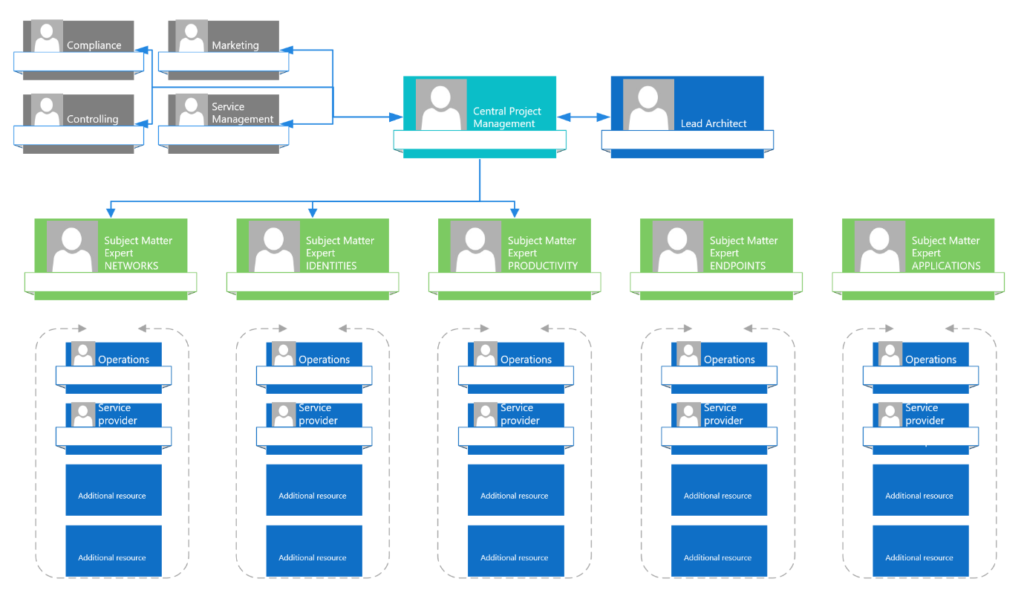
- From an organizational standpoint, the project (or projects) is managed by a general project manager.
- From a technical standpoint, the project (or projects) is managed by a lead architect.
- The project manager and lead architect coordinate closely on the project’s progress.
- Subject matter experts are assigned to the individual disciplines and coordinate closely with the lead architect.
- Depending on the needs of the individual disciplines, additional staff are scheduled to perform specific tasks (e.g., analysis, concept development, functional testing, etc.).
In more complex environments, there may be further topics that should be considered separately. This diagram should therefore be understood as a suggestion for the design of your own project.
Collaboration platform
In addition to organization, every project needs a central platform for collaboration. What could be more obvious than using Microsoft Teams for this? 😉 Of course, there are other suitable platforms as well. However, they should at least offer the following features:
- Virtual Meetings
- Automatic transcription for meetings—especially during M365 migrations, many small details matter, and these are often lost during manual transcription
- Central file storage – the folder structure must be defined by the project manager and should be consistent across all departments/subprojects
- Collaborative file editing
- Ability to integrate additional helpful tools, such as mind maps, diagrams (Visio/Draw.io, Miro), task planning (Planner/Asana), etc.
Furthermore, the following are important framework parameters for a collaboration platform:
| Parameter | Description |
|---|---|
| Communication matrix | A list of all project participants, including their contact information and a description of their individual roles within the project or projects (including stakeholders such as the client and indirectly involved departments such as Controlling and Marketing) |
| Vacation and absence planning | Overview of all absences during the project period for coordinating substitutions and rescheduling if necessary |
Did you know? While Microsoft Planner offers an export feature, it does not support importing. As a result, fully developed Planner boards cannot be easily transferred to other tenants. However, there are third-party add-ins as well as options via Power Automate for importing tasks from an Excel list.
Scheduling
Typically, the project manager starts by creating a project plan. The first draft may be only a rough outline, as not all steps are yet known in detail. The project plan is usually refined further as the project progresses, as the tasks to be carried out become clear and the corresponding workloads can be planned.
However, typical deadlines can already be set, for example,
- Specified project duration
- Project start (so-called “kick-off”)
- Regular meetings (fixed dates)
- General milestone planning (which project phase should/must be completed by when)
For this purpose, it has proven effective to use what is known as backward project planning. This approach starts with the latest possible date for the migration and then works backward to determine the minimum lead time required for each phase and step. However, this requires that project participants already have some experience with such migrations and are therefore able to accurately estimate the potential workload.
The following schedule illustrates an example:
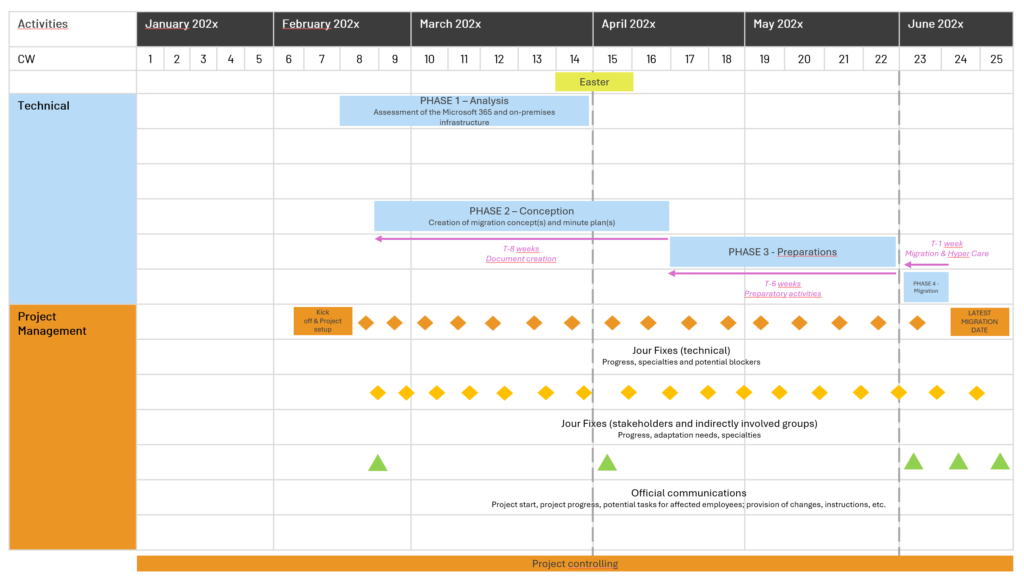
- The stakeholders determine the latest possible date for carrying out the migration.
- As part of an initial analysis, the lead architect gains a general overview of the current state.
- Based on this overview, the amount of lead time required for each phase is determined to ensure that all activities can be carried out appropriately.
- The project start date is calculated backward to ensure there is sufficient time for all phases.
- This determines the resource requirements for each area, and milestones and scheduled deadlines (particularly for sending communications) can be planned.
Again, this should only be considered a suggestion.
Access permissions
When analyzing environments, it may initially suffice—in line with standard best practices—to request read-only permissions (e.g., Global Reader and Security Reader). However, in the case of Teams and SharePoint Online, additional permissions may be required to track individual permissions on sites and channels.
By the time of migration, at the latest, the team carrying out the migration should be able to request higher permissions (up to Global Administrator) if necessary. A Microsoft 365 migration represents a significant intervention in the infrastructure and generally requires many permissions to perform all associated tasks.
It is therefore essential to avoid a situation where, on the day of migration, individual steps cannot be performed due to a lack of permissions, which could result in the migration having to be aborted in the worst-case scenario.
Tip: During migrations, it has been observed that role assignments enabled via Entra Privileged Identity Management often do not function as expected. For example, in Exchange Online, additional email addresses could not be added even though the responsible employee had enabled the Exchange Administrator role (a new login, private browser session, etc., were tested).
Therefore, at least for the duration of the migration, it may be better to assign roles statically to avoid such issues as well.
Project phases
Regardless of the project structure, a project typically goes through several phases, each with a specific focus. The following chapters explain these phases. These are not exclusive to Microsoft 365 projects and can certainly occur in other projects as well.
Phase 1: As-is analysis
At the start of the project, it is necessary to gain an overview – of both the source and the target environment. This so-called "as-is" analysis must lead to at least the following results:
- The time and organizational effort required for the migration can be estimated.
- Potential obstacles and issues are identified so that appropriate mitigation strategies can be developed.
- An overview of the services and resources to be considered and migrated is available.
- Any necessary infrastructure adjustments become apparent (e.g., Active Directory, local Exchange servers, end devices).
- Framework conditions for the migration are established (compliance and security requirements, budget, etc.).
- Communication needs are identified (e.g., migration date, user responsibilities, changes affecting users, etc.).
- Individual tasks (or task packages) can be created and assigned to project participants on an individual basis.
Phase 2: Conception
Based on the results of the as-is analysis, a detailed plan for preparing and executing the migration can now be developed. Depending on whether it is an integration or an outsourcing project, different documents may be generated, for example:
| Document | Migration type | Description |
|---|---|---|
| Migration concept | Integration, carve out | Describes in detail all measures required for the preparation, execution, and follow-up of the migration. |
| Minute plan | Integration, carve out | Presents the detailed timeline of the migration process in chronological order. |
| Fine concept "New introduction of specific service" | Integration | The company being integrated uses a service that is not yet in use at the receiving company but is essential for its continued operation. In this case, a detailed concept is needed to configure the service appropriately (without impacting other users). |
| Feinkonzept "Rebuilding specific service" | Carve out | If a service remains with the transferring company but is also needed by the company being spun off, a detailed concept for its redeployment in the new environment must be created (example: email signature management). |
| Fine concept "Harden Microsoft Tenant" - Fine concept "Conditional Access" - Fine concept "Entra Privileged Identity Management" - Fine concept "Authentication Methods" - ... | Carve out | If a new Microsoft tenant is created for the company being spun off, it must be hardened according to best practices. The detailed concept includes settings for Entra ID (authentication methods, conditional access, PIM, etc.) as well as for the Microsoft 365 services used. Due to the scope, these topics can also be divided into individual concepts. |
| Anleitungen | Integration, carve out | If users are required to perform tasks as part of the migration, appropriate illustrated instructions must be created. |
| Arbeitsanweisungen | Integration, carve out | If administrative processes change as a result of the migration, appropriate work instructions must be created and made available centrally. |
In parallel, the task planning solution (e.g., Microsoft Planner) should be populated with appropriate detailed tasks and assigned to the project participants. It is important to define a final date for each task and to consider any dependencies.
Phase 3: Preparation
Once the migration concept has been created and the task plan populated, preparatory measures can begin. These are divided into technical and organizational preparations.
Technical preparations
Technical preparations include, for example:
- Activation and basic configuration of the migration solution
- Development of a procedure for device migration or planning of a device replacement, including automatic installation
- For spin-offs: Setup of the new client and hardening in accordance with the concept(s), as well as migration of configurations for individual services
- For integrations: Preparation of infrastructure, services, and resources for the addition of new objects (users, groups, devices)
- Execution of initial and delta data synchronizations
The aim of this sub-phase is to prepare the target environment and the resources to be migrated in such a way that the actual migration can be carried out in the shortest possible time frame and without major disruptions.
Organizational preparations
Organizational preparations include, for example:
- Preparation and distribution of communications (including instructions, if necessary)
- Requesting the necessary permissions for the affected services (including external services such as DNS management)
- Adjustment of Microsoft 365 subscriptions (switch to monthly billing, cancellation)
- Market communication (announcement of the change, including potential impacts on future collaboration)
- Conducting FAQ sessions with employees of the affected company
The goal of this sub-phase is to fulfill all relevant requirements and framework conditions so that the migration can be carried out as planned.
Phase 4: Migration
Once all preparations are successfully completed, the migration can be carried out within the planned timeframe. Depending on the migration method and the scope of the resources to be migrated, different timeframes are possible:
| Size | Migration procedure | Timeframe |
|---|---|---|
| Small (up to 500 users) | Cutover | Weekdays, afternoon until late evening |
| Medium (500 to 2000 users) | Cutover or partially staged* | Weekend or with an adjacent public holiday |
| Large (from 2000 users) | Staged | Weekly migration of larger packages with subsequent prioritized support. |
* Partially staged: data migration during the takeover process, end devices subsequently and step by step
A meeting is to be scheduled for the morning of the migration day. Its objectives are as follows:
- Verification = All project stakeholders essential to the migration are present and available
- Understanding = All project stakeholders are aware that a migration is imminent and understand their respective roles in the process
- Access = All access rights required during the migration are known, available, and functioning
A separate meeting should be scheduled for the actual migration. It is recommended that this meeting be planned digitally as well. This allows project participants to quickly coordinate with each other, especially if they are not located in the same place.It also allows stakeholders to join the meeting and get an update on the current status.
Phase 5: Hyper Care
It would be unrealistic to expect a migration to be completed entirely without disruptions or issues. Typically, the planned processes (e.g., MFA registration, device migration, access to migrated data) work for the majority of users.
However, some users may encounter problems for various reasons. Especially in larger companies, this can quickly result in a very high workload for the service desk.
For this reason, it is recommended to temporarily allocate additional resources to handle such issues. These resources can, for example, be provided by the project team. Alternatively, engaging an external service provider or involving other (IT) departments within the company—such as so-called “power users”—is also a viable option.
The goal is to resolve issues as quickly as possible to ensure normal business operations. In larger migrations, this also helps ensure the acceptance of users who have yet to migrate. These users see that issues are addressed promptly and can thus approach their own migration with confidence.
The duration of such prioritized support (also known as “Hyper Care”) depends on the migration process and the number of users being migrated. Accordingly, this phase typically ranges from a few days to one or two weeks.
Phase 6: Cleanup
Once the migration is complete and no major issues remain, the final phase can begin. This phase aims to clean up the source and target environments and bring the project to a close.
Cleanup includes tasks such as:
- Removal of access rights (personalized accounts and access rights for the migration solution)
- Decommissioning of systems no longer needed (e.g., migration solution, Exchange Server)
- Cancellation of subscriptions (third-party products, Microsoft 365 licenses, etc.)
At the end of the project, it is recommended to hold a meeting with all project participants and gather experience:
- What went well?
- What could have gone better?
- How was communication perceived during the project?
- Was the planned project timeline realistic?
- Were sufficient resources allocated for the project?
- ...
The experience gained can help improve future projects, especially when further Microsoft 365 migrations are planned. These can significantly benefit from this experience. Therefore, it is also advisable to repeatedly remind project participants throughout the project to document their experiences.
Conclusion
A Microsoft 365 migration is inherently a very complex undertaking. However, a well-planned approach and a thoughtful project structure are crucial to its success. This enables a careful and considered execution of the migration, and the experience gained is invaluable – not just for Microsoft 365 migrations!
Liked this article? Share it!


3 thoughts on “Microsoft 365 Migrations | Part 3: Project Organization”