
Microsoft 365 Migrations | Part 8: Communicate, communicate, communicate!
 Krähe mit Hut
The first commandment of the Change Bible is:
1 You shall communicate.
Why is this so important? Because people are creatures of habit and therefore tend to be skeptical of change. This effect is amplified when changes must occur on multiple levels—such as behavior, technology, organization, and so on.
This article explains why, especially during a Microsoft 365 migration, detailed yet targeted communication is extremely important for the project’s success.
The psychological aspect
The effects of change have been studied extensively in recent years and decades. Based on the findings from these studies, two descriptive models have emerged; although they originated from different perspectives, they complement each other well:
- The Change Curve by Kuebler/Ross and Streich
- The House of Change by Janssen
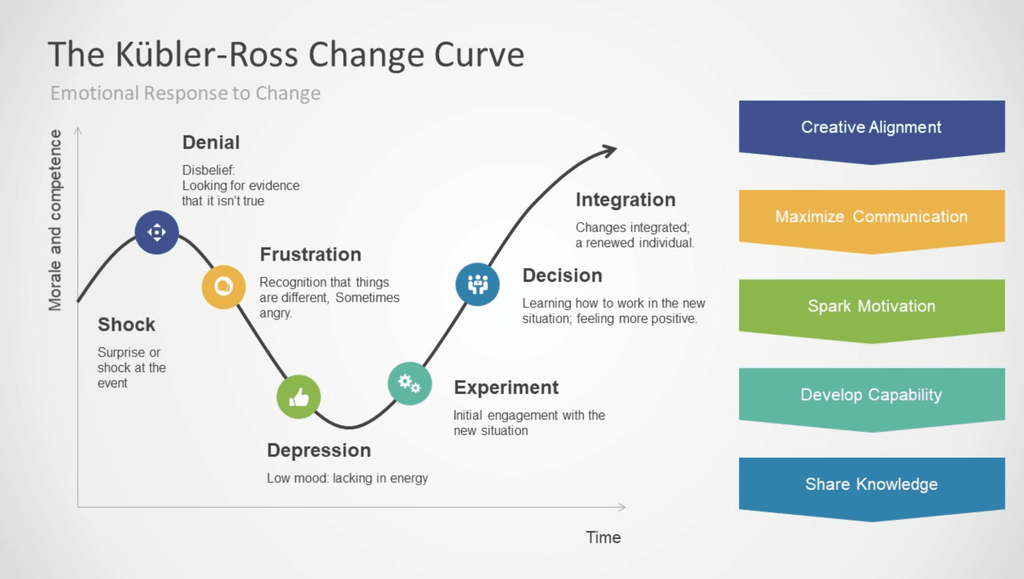
The change curve described by Kuebler-Ross and Streich (which also exists in other variations) outlines the various emotional states through which a person typically reacts to change. Depending on personal circumstances and experiences, the reaction may be more intense or more moderate in certain aspects.
Generally, however, people always go through the stages shown in some form (with a few intermediate stages):
| Stage | Meaning |
|---|---|
| Denial | People resist change and find it difficult to understand the purpose of it. This is a defensive reaction intended to alleviate the emotional impact. |
| Frustration | It is recognized that change cannot be prevented. This can lead to resignation and a decline in motivation. |
| Bargaining (also rational/emotional acceptance) | People begin to look for ways to cope with the change, and in doing so, they develop hope. Often, however, they try to return to the way things were, which usually doesn't work. |
| Depression | The loss of familiar routines or people can lead to feelings of despondency and fear of loss. One’s own goals and/or those of the company are called into question. |
| Acceptance | You begin to accept the change. This leads to renewed motivation and, perhaps, a willingness to grow along with the change. |
(Image source: Kubler Ross Change Curve for PowerPoint)
Janssen’s “House of Change” (which also exists in other versions) is a further development of the change curve. The differences lie in the perceived sense of control over the change and in seeing oneself as part of the change.
However, the “House of Change” is designed to be simpler in order to make it easier to understand change. In this model, one goes through the following phases:
| Stage | Meaning |
|---|---|
| Contentment | People are satisfied with the current situation. The processes are familiar and well-established, and they feel they have absolute/complete control. |
| Censorship | People are skeptical of the impending change or reject it. It is perceived as unnecessary or even disruptive because it alters established procedures. |
| Confusion | You come to realize that something will or must change. However, this can lead to feelings of loss. It can also create chaos, since new procedures haven't been established yet and mistakes keep happening. |
| Inspiration | New routines are taking hold, and the first signs of success are becoming visible and noticeable. A sense of control is returning. At the same time, there is a sense of relief, as the previous phases were sometimes exhausting. |
(Image source: Janssens-Model-Four-Rooms-of-Change_en-1.png (650×648))
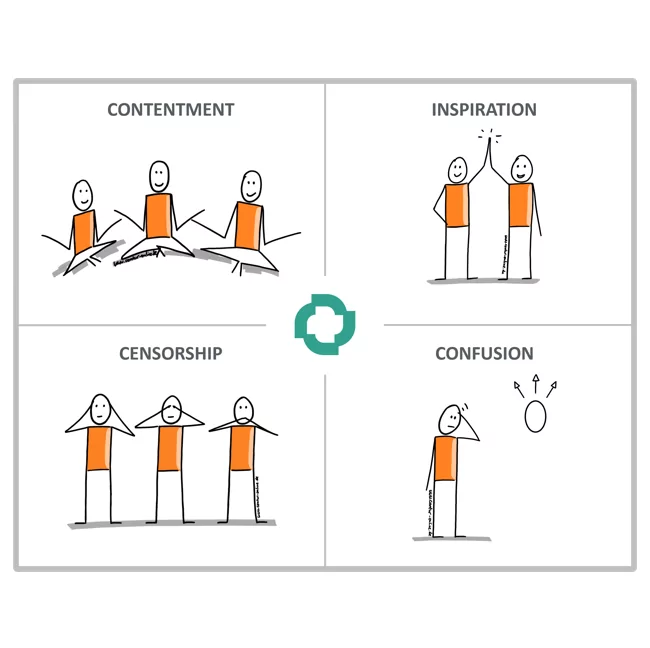
You should always keep these models and the individual phases in mind whenever a change occurs, so you can develop a sound communication strategy tailored to your specific situation. But enough about psychology. 😉
Changes during a Microsoft 365 migration
During a Microsoft 365 migration, users may experience many changes—some of them significant—within a short period of time, such as:
- Technical (new login credentials/authentication, new work devices)
- Organizational (new company, new job title, new supervisors, change of workstation/location)
- Process-related (different procedures for HR matters, procurement, IT requirements)
In principle, each of these changes follows its own change curve. Consequently, too many changes at once can lead to emotional overwhelm among employees. This must therefore always be kept in mind throughout the entire course of the project!
In addition, it is important to recognize that employees have varying levels of technical proficiency. Therefore, we cannot expect every employee to have the same level of understanding or to contribute in the same way. Some will need closer guidance and more support during the transition.
Development of a communication strategy
The aspects described above highlight the importance of effective communication in a project of this kind. Accordingly, an appropriate communication strategy should be developed. This strategy is divided into the following components:
- Objectives—What do I want to achieve? Are my objectives SMART*-compliant and therefore clear and measurable?
- Content—What do I need to communicate? How much detail should I include?
- Timeline – When do I communicate what? During which phase should I communicate more intensively, and during which phase should I communicate less?
- Medium – Through which medium do I communicate? Does the chosen medium work for all recipients?
- Target Audience – Who is the recipient of my communication?
(* SMART criteria – Wikipedia)
The fundamental goal of any communication must be to provide employees with clear and unambiguous answers to the following questions:
- What is the purpose of this communication?
- Who is affected?
- What specifically will change for me?
- Why is this change important to me? (Ideally, benefits can even be highlighted!)
- How much time do I have to adjust to this/implement the change?
- What happens if I don’t implement the change (if my participation is required)?
Mitigating or negative statements should be avoided whenever possible so as not to reinforce employees’ resistance.
Involvement of key users

Even with the most sophisticated communication strategy, it’s typically not possible to reach all employees equally. Therefore, it makes sense to also identify so-called “key users.” These individuals should be fundamentally open to change and able to handle it. Their role is to convey the change positively within their respective departments and thus serve as “guides” throughout the change process.
In this way, the burden of communication can be shared among many people. Employees can turn to colleagues they know to ask questions or discuss their individual concerns. This can help minimize negative office gossip or the spread of (false) rumors—or clarify them as quickly as possible.
Definition of target audiences

During a Microsoft 365 migration, it is necessary to address different target groups and provide them with different information:
| Target audience | Information (for example) |
|---|---|
| End user | Planning of the integration/carve-out project and the resulting changes, as well as any obligations to participate |
| Business or division management | Planning the integration/carve-out project and the legal framework |
| Market | Planning the integration/carve-out project and the resulting changes to future accessibility and communication |
| Partners, service providers and suppliers | Planning the integration/carve-out project and the resulting changes to future communication, as well as access to the corporate environment, if applicable |
| Corporate functions (e.g., Marketing, HR, IT) | Changes to processes, policies, security requirements, etc. |
For each of these target groups, communication must be carefully tailored in terms of style, etiquette, and content. Furthermore, care must be taken to ensure that information that is still considered confidential at that time (such as changes to the company name or other legal matters) is not inadvertently disclosed to the public.
Communication sequence

The general sequence of communications is largely determined by the planned process and the chosen migration methodology. The following table shows some typical communications that may be useful or necessary during a Microsoft 365 migration:
| Communication | Content(s) |
|---|---|
| Migration announcement | Announcement of the overall project (integration/spin-off), though typically without a specific migration date (as this depends on the results of the current state analysis) - Announcement that a specific date will be announced at a later time - Description of the key factors: - Why is the change being implemented? - How will the change affect employees? - Is employee participation required? - What is the general timeline (outlined in broad terms)? - Where can questions be directed? Are there FAQs available, and who are the key users? |
| Start or end of the analysis phase | - Announcement of the start of the current state analysis as the basis for further scheduling and its completion - Identification of dependencies/special considerations as well as individual responsibilities - Goal: Prepare for the changes as thoroughly and completely as possible to minimize disruptions during and after the transition |
| Announcement of the migration date | - Migration date determined based on the analysis results - General migration process depending on the selected time (weekday, weekend/holiday) - Notification regarding the sending of login credentials during the preparation phase |
| Start and end of the design phase | - Announcement of the start of the design phase as the basis for further communications (guidelines) or its completion - Project-specific determination of required contributions, changes to technical processes, and any (temporary) restrictions that may arise, as well as the development of individual communications and guidelines - Detailed definition of the necessary preparatory measures and the migration process |
| Sending additional personalized communications | - e.g., special notes, instructions, and work procedures as needed |
| Start and end of the preparatory phase | - Announcement of the start of the preparation phase as the basis for carrying out the migration and ensuring its successful completion (so that it is clear the migration can proceed as planned) - Sending out login credentials (internal/external users; re-inviting guests if necessary) |
| Reminder of upcoming migration | - On the day of the migration, or one day before if the migration falls on a weekend or holiday - A reminder of how to contact the service desk after the migration - A reminder that issues resulting from the migration will be handled as a priority |
| Successful completion of the migration | - Notification that the migration is complete and no further changes are planned - Affected employees - Other internal employees - Partners, service providers, and suppliers - The market - Notes on any special circumstances that arose during the migration - Praise and thanks for cooperation during the migration (be sure to specifically name and acknowledge the project team!) |
Communication medium

There are various options for distributing communications. These depend on the following factors:
- Which media am I familiar with and/or are technically available to me?
- Who is the intended audience, and what communication channels are available to them?
- Do I need to send only text/content, or also attachments?
- Do I need to send confidential information?
- Do I want to receive technical confirmation that the communications were received?
The following table compares typical communication channels. This table should not be viewed as an exhaustive list of criteria for selecting the appropriate communication channel. Rather, it offers suggestions as to which channel is likely to be most suitable in which situation, possibly in combination with another channel:
| Criterion | Instant messaging (Teams) | Video recording | Video conference | |
|---|---|---|---|---|
| Availability | Very widespread use in a business context | Widespread, but not universal | All it requires is internet access | Typically usable with any participants, regardless of the solution |
| Content | Text, attachments of any kind, audio files as attachments (though this is rather uncommon) | Text, attachments of any kind (subject to company restrictions, if applicable), voice messages (disabled, if applicable) | Spoken content only; text is limited (e.g., in the form of slides) | Text, attachments of any kind |
| Sensitivity | Not very good, though encryption is available via Purview Message Encryption, S/MIME, or PGP | Not very good, since end-to-end encryption isn't available | N/A (Video recordings typically do not contain confidential information) | Depending on the solution you choose, Teams supports end-to-end encryption for meetings (though this limits other features) |
| Read/receipt confirmation | Both are available, but traceability and reliability are rather poor (voluntary participation) | Generally available, but not actively queried; traceability via message properties | N/A (Views are typically anonymized) | N/A (Attendance can be tracked) |
| Bulk sending | Very good (via distribution groups) | Limited (via M365 groups/channels); generally intended only for internal users within each tenant | N/A (centralized provisioning; access link sent via another method) | Very good (sending the invitation via another method) |
In my personal experience, these tools are typically used in combination as follows:
- Email as the general medium for sending all communications and, if necessary, instructions as attachments
- Teams as a separate tool for the automated distribution of access passwords (if no alternative, such as Onetime Secret, is available)
- Video recordings as part of a centrally hosted FAQ platform and to support employees in their participation
- Video conferencing for the kickoff event as well as for FAQ sessions with employees
Typical communication documents
The following chapters present some documents that have been created during my previous migration projects and that must be provided to their intended recipients on a regular basis. Of course, there is much more content that needs to be communicated to employees. The following documents are therefore intended to give you a general idea of the topics that require attention during a Microsoft 365 migration.
Work instructions

Work instructions are intended for IT staff. They describe tasks that (may) arise during day-to-day operations. Essentially, these are step-by-step guides for applications and systems that may be transferred to the responsibility of another department as part of a migration.
To make it easier for employees to access these systems, these documents provide a basic overview of how they work and how to use them. The following table shows a selection of documents that I have created or contributed to as part of migration projects. The topics covered are largely independent of one another. This indirectly illustrates how complex such a project can become, as many different topics must be taken into account.
| Document title | Background | Contents |
|---|---|---|
| Connecting apps to Azure Communication Services | Azure Communication Services was introduced for sending email from apps that do not support modern authentication. From a technical standpoint, this is a better approach than using app passwords, sending directly, or using an SMTP relay in Exchange Online. | Procedure for setting up a new sender address and login credentials for the system or application being used |
| Switchover CTS users | Before the migration, cross-tenant synchronization is set up to provision user objects in advance. In some cases, employees need to be switched to a full-featured user account even before the migration so they can, for example, receive emails. | Procedure for converting synchronized accounts to full-fledged user accounts |
| Certificate application | Some employees need to exchange encrypted emails with certain customers. These customers only accept S/MIME as a method. Accordingly, employees must be provided with a personal certificate. | Procedure for requesting and obtaining a certificate through the selected provider |
| Extend password safe | Ideally, a company should use a centralized solution for managing access credentials—a so-called password vault. As part of an integration, it may be necessary to expand the solution to enable the new company to use it. | Expansion of the solution to meet specific needs and configuration of access rights in accordance with naming and authorization policies |
| Configure VPN tunnels and accesses | Typically, companies use VPN solutions to connect service providers, partners, and other companies to their own organization. As a result, new tunnels and access points must be added on a regular basis. | Procedure for configuring the framework parameters for establishing an S2S tunnel; Procedure for setting up a user-based VPN tunnel |
User instructions

User guides are intended for a company’s employees. They can describe a variety of topics, such as
- Workflows and processes
- Procedures, such as setting up one’s own device or establishing a VPN connection
User guides aim, on the one hand, to reduce the workload on the service desk by delegating tasks that employees can perform on their own. On the other hand, they can help improve employees’ understanding of workflows and technical aspects within the company.
The following table shows a selection of documents that I have created or contributed to as part of migration projects. The respective topics are largely independent of one another.
| Document title | Background | Contents |
|---|---|---|
| Setting up the new user account | As part of a spin-off or merger, employees are assigned new accounts. For these accounts, an individual password must typically be assigned and a secure authentication method (MFA) must be set up. | Steps for setting up a new user account and an explanation of why secure authentication is required |
| Create meeting recordings in Teams | In one organization, creating meeting minutes was permitted only after approval. Once approved, users can enable the necessary permission through Entra Privileged Identity Management. | Procedure for activating the required group in Entra Privileged Identity Management |
| Adjustments to endpoints during migration | In some migration projects, the devices were carried over as-is (i.e., not reinstalled). As a result, employees were required to perform the necessary migration steps on their own devices. | Procedure for configuring all necessary settings and apps on work devices (Windows, Mac OS) and mobile devices (tablets, smartphones) |
| Connect to corporate resources via VPN | During a merger or spin-off, two VPN solutions that operate differently may sometimes be in use for a transitional period. | Procedures for using different VPN solutions and a description of their features and limitations |
| Us of work equipment at a corporate site | When new standards for workplace equipment are established, employees may in some cases need to adjust or require training on how to use alternative devices. | Description of the site's unique features and use of the workstation equipment available there |
Conclusion
Effective communication is an often-underestimated yet extremely important factor in Microsoft 365 migration projects. Employees are facing massive changes. In addition to technical factors, there are also uncertainties regarding the new company, new locations, processes, and so on. Poor communication can amplify these uncertainties and lead to (massive) employee turnover. It is therefore better to guide the workforce safely through all the “pitfalls” via targeted and careful communication and to support them as best as possible along the way!
Liked this article? Share it!